How to Program a Schlage Keypad Lock
To program a Schlage keypad lock, enter the six-digit programming code printed inside the lock, press the Schlage button, then type your new four-digit code. Set the programming code first, then add up to 19 user codes at the keypad.
On this page (11 sections)
- How to program your first Schlage keypad code
- What you need before you start
- How do you add a user code to a Schlage keypad lock?
- How do you change or remove a code?
- How do you set the programming code itself?
- How to program a Schlage keypad lock on the lever model
- Does a smart lock program the same way?
- Which Schlage keypad lock fits your door?
- What should you do when a code won't work?
- What else can you program on these locks?
- The short version of programming a Schlage keypad lock
To program a Schlage keypad lock, open the door, enter the six-digit programming code, press the Schlage button, then type your new four-digit user code. Set the programming code before you add anyone else's code, because every other step depends on it.
The whole job happens at the keypad and takes a couple of minutes per code. You don't need a phone, a hub or a screwdriver once the lock is on the door.
How to program your first Schlage keypad code
Start by finding the six-digit programming code on a label inside the exterior keypad assembly. Open the door and look behind the interior cover for it, then keep the number private, since it controls every code on the lock.
Some locks ship with it printed on a card in the box instead. Either way, write it down and store it away from the door.
Two four-digit codes come pre-programmed for setup out of the box. They're meant to get you in, so replace them with your own codes rather than relying on the factory ones.
Once you have the programming code, the next step depends on the model you own.
What you need before you start
You need the programming code, the lock unprotected, and a few minutes at the door. Have a pen ready so you can write down each code you create.
Do the work with the door open. That way you can see what the keypad is doing and step inside if a code doesn't take.
Decide who gets a code before you start. Schlage locks hold up to 19 user codes, which covers family, a cleaner and a neighbor without ever passing out keys.
How do you add a user code to a Schlage keypad lock?
To add a user code, enter the six-digit programming code, press the Schlage button, enter the four-digit user code, then press the Schlage button again. The lock confirms each step with the keypad lights and a beep.
Repeat the same sequence for each person. Give each person a different four-digit number so you can tell the codes apart.
Avoid easy guesses like 1234 or your street number. A four-digit code on a front door is only as strong as the number you choose.
If the lock rejects the sequence, start over from the unprotected position rather than guessing at the middle steps. The button presses are quick and the lock times out if you pause too long.
How do you change or remove a code?
To delete a code, enter the programming code, press the Schlage button, enter the four-digit code you want gone, then press the Schlage button once more. The lock plays a confirmation tone when the code is removed.
Do this when someone moves out, when a contractor finishes a job, or when a code has been shared too widely. It's faster than changing the locks.
To change a code for the same person, remove the old one and add the new one in two separate steps. Don't assume the lock overwrites a code just because the slot number matches.
Keep a written list of the codes in use and update it each time. It's the only way to know how many of the 19 slots are taken.
How do you set the programming code itself?
To change the programming code, enter the current six-digit code, press the Schlage button, press the top-left keypad button, then type a new six-digit code. The old and new programming codes both work until you complete the final step.
That final step is the reset. Find the small button on the interior assembly, press it, and hold it until the lock signals.
After that, only the newest programming code opens the programming menu.
Change the programming code when you move into a home with a keypad lock, and any time you suspect the number has leaked. It's the master key to the whole system, so treat it like one.
How to program a Schlage keypad lock on the lever model
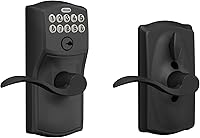
The steps on a Schlage Keypad Lever are the same programming sequence, just on a lever rather than a deadbolt. Enter the programming code, press the Schlage button, then enter the four-digit user code.
One difference is the flex-lock switch on the inside. Set it to automatic relocking and the lever locks itself after entry; set it to unprotected and it stays open until you lock it by hand.
Decide which mode suits the door before you hand out codes. A back door people use with full hands works well with auto relock, while a garage entry you pass through often may suit the unprotected setting.
The lever and the deadbolt use the same basic code steps, so what you learn on one carries over to the other.
Does a smart lock program the same way?
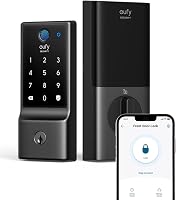
No. The Schlage Encode keys codes through the Schlage Home app, not the keypad sequence.
With the lock on WiFi, you add, edit and delete codes from the app, up to 100 of them, and set each one for a person or a time window.
The keypad still works for entry, and a four-digit code typed on the touchscreen opens the door. The programming just moves to your phone.
That matters if you rent the space or hand out temporary access, since you can revoke a code from anywhere without touching the door. It also gives you a lock history and notifications when the door opens.
For most homes, the app route is easier with more than a few users. The keypad-only models stay simpler for a house with three or four people and no need to manage access remotely.
Which Schlage keypad lock fits your door?
Pick the Schlage BE365 deadbolt if you already have a deadbolt on the door and want keyless entry without WiFi. Pick the keypad lever if you're replacing a knob set, and the Encode if you want app control.
The BE365 carries a Grade 2/AAA rating and fits standard 2-3/8 in or 2-3/4 in backsets. Its 9V battery runs up to 2 years of typical use, and a low-battery indicator warns you before a lockout.
If you're still comparing keypad models before you buy, our guide to the best keypad deadbolts covers the field, and the Schlage BE365 review goes deep on the model most people start with.
On a door that needs a handle rather than a deadbolt, compare smart door handle locks before committing to a lever.
What should you do when a code won't work?
First, check that you finished the sequence. A keypad code fails most often because the Schlage button wasn't pressed at the end, so the lock never saved it.
Next, confirm the lock is unprotected when you start. Programming steps run from the unprotected state, and starting from a locked door sends you into the wrong menu.
If several wrong codes have been tried, the lock pauses keypad entry for a short time. Wait it out, then use the physical key to get in and start fresh.
Batteries are the other common cause. A weak 9V battery can make the keypad behave oddly before the low-battery warning shows, so swap it and try again.
What else can you program on these locks?
Beyond user codes, you can change the programming code and delete codes you no longer trust. Those three jobs cover almost everything a household needs.
Codes are the main tool. Keep the list short and current, and change a code the moment someone with access no longer needs it.
The mechanical key still works as a backup on the deadbolt and lever models, so keep one stored safely off the property. For other lock styles, the steps for how to program a fingerprint door lock follow a similar pattern of admin entry, then user entry.
Once your codes are set, test each one at the door with it closed, then again from outside. A quick test saves a lockout later.
The short version of programming a Schlage keypad lock
To program a Schlage keypad lock, find the six-digit programming code, enter it at the keypad, press the Schlage button, then add each four-digit user code. Delete codes you no longer want, and change the programming code when access changes hands.
Pick the BE365 for a deadbolt, the keypad lever for a knob replacement, and the Encode if you want codes managed from an app. Any of the three gets you keyless entry without a key under the mat.
Frequently asked questions
Where do I find the six-digit programming code?
It's on a label stuck to the inside face of the exterior keypad assembly, so you see it only with the interior cover off and the door open. Write it down once you find it and keep it somewhere private.
Can I change the programming code later?
Yes. With the lock unprotected, enter the current programming code, press the Schlage button, press the first button on the keypad, and type a new six-digit code.
Both the old and new code work until you reset the lock with the button on the inside assembly.
What happens if a code is used too many times wrong?
The lock temporarily stops accepting keypad entries after repeated failed attempts. Wait it out, then try again with a code you know works, or use the physical key to get in.
Do Schlage keypad locks work in the dark?
Yes. The silicone-coated buttons light up when pressed, so you can enter a code at night without a light.
The Schlage Encode uses a touchscreen that lights when you touch it.