10 Best Smart Door Handle Locks (October 2026)
The best smart lever locks include the Schlage Keypad Lever for code-only homes, the Yamiry Fingerprint Handle Lock for flexible entry, and the Kwikset SmartCode 917 for large households.
On this page (5 sections)
The Schlage Keypad Lever is the best smart door handle lock for straightforward code entry, with up to 19 codes and a switch for passage or automatic relocking. For smart home features, choose the Aqara U300 for Apple Home Key or a Philips set for Wi-Fi app control.
The right smart lever lock depends on your door prep and how people enter. Some picks are keypad levers, while others combine a handle set with a deadbolt, so measure your door and identify the hardware you need to replace.
Start with our guide to choosing a keyless door lock if you're still comparing lock types. For other keypad options, see our best keypad deadbolts.
Our picks at a glance
-
1
-
2

-
3

Which smart door handle lock fits your entry?
The Schlage Keypad Lever is the strongest choice for simple code access, while the Aqara and Philips options add app or smart home features. These picks cover traditional keypad entry, connected access and full handle sets.
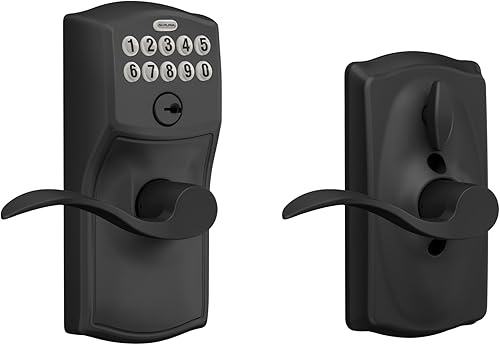
Schlage Keypad Lever: Best for code-only homes
- Up to 19 user codes
- Flex-Lock passage or automatic relocking
- Grade 2/AAA rating
- Dedicated low-battery indicator
The Schlage combines a keypad with a lever and lets you switch between passage and automatic relocking. It fits buyers who want code entry without app or network features.
Pros
- Up to 19 user codes
- Silicone-coated illuminated numbers
- No hardwiring
Cons
- No app control
- Battery life depends on typical use
Schlage suits a side door, garage entry or home office where you want code access without adding an app to your routine. It comes with 2 pre-programmed codes and supports up to 19 codes for family or trusted visitors.
The Flex-Lock switch lets you choose passage mode or automatic relocking. Its silicone-coated keypad numbers light up when pressed, which helps with code entry in low light.
Schlage gives this lever a Grade 2/AAA rating and a low-battery indicator. It runs on an included 9V battery, with up to 2 years of life under typical use.
Choose it if you want a keypad lever with a simple mode choice. Skip it if you need remote access, phone alerts or activity logs.
Yamiry Fingerprint Handle Lock: Best for flexible entry
- Fingerprint, app, passcode, fob and key access
- Alexa voice and remote control require separate Wi-Fi gateway
- Temporary and one-time passcodes
Yamiry offers several local entry options alongside Bluetooth app control. Remote control and Alexa voice open require a separate Wi-Fi gateway.
Pros
- Multiple ways to enter
- Temporary and one-time codes
- Reversible handle
Cons
- Remote control requires a separate gateway
- Confirm fit with your door measurements
Yamiry suits households that want several ways to enter at the same door. It supports fingerprint, Bluetooth app, passcodes, key fobs and mechanical keys, with Alexa voice open and remote control available through a separate Wi-Fi gateway.
The app can create permanent or temporary access and one-time passcodes for visitors. Yamiry says the handle can be reversed for left- or right-handed doors, and installation uses a screwdriver on most standard American wooden front doors.
Remote access depends on the gateway, so plan for that extra device if you need control while away. Skip this pick if you want a simple keypad lock without an app or extra setup.
Kwikset SmartCode 917: Best for large households
- Up to 30 user codes
- Passage, auto-lock and disable-passage modes
- Reversible lever
- SmartKey re-keying
The SmartCode 917 holds up to 30 user codes and has three entry modes. It suits households or property managers who want more code capacity and a keyed backup.
Pros
- Up to 30 user codes
- Three entry modes
- Reversible lever
Cons
- No app control
- Check backset, cross bore and door thickness
The SmartCode 917 suits a household or property manager who needs many individual codes and a keyed backup. It stores up to 30 user codes and offers Auto Lock, Passage and Disable Passage modes.
The lever is reversible for left- or right-handed doors. Kwikset also includes SmartKey Security, which lets you re-key the lock yourself, and says the battery can last up to 3 years.
This model has keypad and key access, not app control. Skip it if remote management is a must, and check the door's backset, cross bore and thickness before choosing it.
Philips Wi-Fi Deadbolt with 2 Handles: Best for remote guest access

- App, fingerprint, PIN, key and voice access
- Gateway included
- Up to 100 user codes and unlimited one-time PINs
This Philips set pairs a Wi-Fi keypad deadbolt with two handles and a gateway. The app supports remote lock control, status checks, access history and permissions.
Pros
- Gateway included
- Up to 100 user codes
- Auto-lock timer from 30 to 180 seconds
Cons
- Supports 2.4 GHz Wi-Fi only
- Check bore and backset dimensions
This Philips option suits a buyer replacing a deadbolt and adding two handles while gaining remote app control. Its app can lock or open remotely, show lock status and access history, send notifications, and manage permissions for family and guests.
You can enter by app, fingerprint, PIN, key or voice command through Alexa or Google Assistant. Philips lists up to 100 user codes and unlimited one-time PINs, plus an auto-lock timer from 30 to 180 seconds.
The set fits most standard doors 35–50 mm thick, with a 54 mm cross bore and a 60 mm or 70 mm backset. It uses 2.4 GHz Wi-Fi, so skip it if your network only provides 5 GHz Wi-Fi or your door prep does not match.
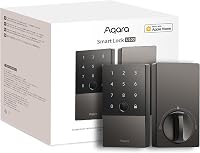
Aqara U300: Best for Apple Home Key

- Apple Home Key with a compatible Thread-enabled Apple hub
- Matter over Thread
- Fingerprint, keypad and Bluetooth app control
The U300 brings Apple Home Key and Matter over Thread to a lever lock. Each smart home platform needs a compatible Thread-enabled Matter controller.
Pros
- Tap iPhone or Apple Watch for Apple Home Key
- Supports up to 25 fingerprints
- USB-C backup power ports
Cons
- Requires a compatible hub for network integration
- Not Wi-Fi enabled
The Aqara U300 is the clearest choice for an Apple household that wants Home Key on a lever lock. You can tap an iPhone or Apple Watch to enter, and the lock also supports fingerprint, keypad and Bluetooth app control.
Apple Home Key needs a Thread-enabled Apple hub, such as HomePod mini, HomePod 2nd Gen or Apple TV 4K from 2021 or 2022. Other smart home platforms also need a compatible Thread-enabled Matter controller.
Aqara says the U300 can run up to 10 months on 4 AA alkaline batteries. It is not Wi-Fi enabled, so skip it if you need direct Wi-Fi control or do not have a compatible hub.
Kwikset SmartCode 955 Lever: Best for high-traffic doors

- Designed for 500,000 cycles
- Up to 30 user codes plus one one-time code
- Grade 2 BHMA security, durability and finish
The SmartCode 955 is designed for higher-traffic entryways, with a 500,000-cycle durability rating and keypad lighting. Its code setup includes a one-time user code.
Pros
- Designed for 500,000 cycles
- Grade 2 BHMA certified
- Three lock modes
Cons
- No app control
- Uses a 9V battery
The SmartCode 955 fits a busy entryway where a lever sees frequent use. Kwikset says it is designed for 500,000 cycles, and it supports up to 30 user codes plus one one-time code.
Its three modes include Auto-Lock, Passage and a setting that disables the turnpiece to keep the lock in Auto-Lock mode. The keypad lights up for low-light entry, and the model has Grade 2 BHMA certification for security, durability and finish.
Choose it for frequent keypad use without a phone app. Skip it if you need remote code changes or app alerts.
Philips Wi-Fi Front Lock Set: Best for matching hardware

- Wi-Fi app, fingerprint, PIN, key and voice access
- Two handles included
- Up to 100 user codes and unlimited one-time PINs
The Philips set pairs a Wi-Fi keypad deadbolt with two handles. Its app supports remote management, access history and permissions for family and guests.
Pros
- Two handles included
- Up to 100 user codes
- Auto-lock timer from 30 to 180 seconds
Cons
- Check door measurements before buying
- Confirm voice control setup for your smart home
The Philips Wi-Fi Front Lock Set suits buyers who want to replace a deadbolt and add matching handles. It offers app, fingerprint, PIN, key and voice access through Alexa or Google Assistant.
The app supports remote lock management, status checks, notifications, access history and permissions. Philips lists up to 100 user codes and unlimited one-time PINs, and an auto-lock setting from 30 to 180 seconds.
The set includes four batteries and is designed for doors 35–50 mm thick. Check your door measurements first, and skip it if you need only a standalone lever replacement.
DESLOC B200: Best for nearby app control

- Fingerprint, PIN, app, eKey, fob and key access
- Bluetooth app control within 2 m
- Optional gateway for remote control
The B200 gives you several ways to enter, including fingerprint and PIN. Bluetooth app control works nearby, while remote control and voice features require an optional gateway.
Pros
- Multiple entry methods
- USB-C emergency power port
- Low-battery indicator
Cons
- Batteries are not included
- Gateway is sold separately for remote control
The DESLOC B200 suits a buyer who wants fingerprint and PIN access with nearby app control. It also supports eKey, fob and physical-key access, while Bluetooth app control works within 2 m.
The B200 runs around 12 months on 4 AA batteries, which are not included. It also has a low-battery indicator and a USB-C emergency power port.
Remote control and voice features require a G2 Gateway sold separately. Skip this model if you expect full remote access straight from the lock without additional equipment.
Ultraloq Latch 5: Best for gateway-free Wi-Fi

- Built-in 2.4 GHz Wi-Fi
- Fingerprint, app, code and key access
- Remote temporary passwords and access logs
The Latch 5 combines a lever with built-in Wi-Fi, so remote app access does not need a separate gateway. It supports temporary passwords, access logs and notifications.
Pros
- Built-in Wi-Fi
- Temporary passwords can be shared remotely
- Weatherproof exterior
Cons
- Wi-Fi is 2.4 GHz only
- Check fit and installation tips for your door
Ultraloq Latch 5 is a strong fit if built-in Wi-Fi and remote guest access matter. It supports app, fingerprint, code and mechanical-key entry, and its Wi-Fi connection does not require a gateway.
The app supports remote temporary passwords, access logs and real-time notifications. Ultraloq describes the exterior lock as weatherproof.
Choose it when remote access is central to your routine and you prefer a lever form. Skip it if your home network does not support 2.4 GHz Wi-Fi or you want a keypad-only lock.
Yale Assure Electronic Handle: Best for single-hole doors

- Designed for doors with one hole and no deadbolt
- Backlit touchscreen keypad
- Two physical keys and 9V backup charging
The Yale Assure replaces a lever or knob on a single-hole door without a deadbolt. It provides a keypad and physical-key backup, with an optional upgrade path for connected control.
Pros
- Designed for single-hole doors
- Two physical keys
- Reversible handing
Cons
- This model is non-connected as sold
- Check thickness, backset and cross bore
The Yale Assure Electronic Handle is designed for a door with one hole and no deadbolt. It replaces a lever or knob, uses a backlit touchscreen for PIN entry and includes two physical keys.
This is a non-connected keypad model as sold. Yale describes an upgrade path through a Yale Network Module or Connected by August Kit, and the lock has a 9V backup charging option on the keypad.
Yale specifies door thickness from 1-3/8 to 1-3/4 in. Choose it for a single-hole door; skip it if you need connected features without adding an upgrade.
How we compared smart lever locks
We compared access methods, code capacity, connectivity, lock modes and fit details against common needs for a door handle lock. The scores reflect how well each feature set matches those needs, including how much setup connected features require.
A keypad lever is usually easier to manage if you want codes at the door and don't need phone control. A connected lock adds remote access, logs or smart home features, though some models need a gateway or hub.
For a broader look at keypad and app options, read smart lock or keypad lock: which should you choose?. For locks that can work with Apple Home, see our Apple Home Key lock guide.
| Product | Best for | Access | Lock modes | Security | Our score |
|---|---|---|---|---|---|
| Schlage Keypad Lever | code-only homes | Keypad; up to 19 codes | Passage or automatic relocking | Grade 2/AAA rating | 8.1 |
| Yamiry Fingerprint Handle Lock | flexible entry | Fingerprint, app, passcode, fob or key | 7.8 | ||
| Kwikset SmartCode 917 | large households | Keypad or key | 7.8 | ||
| Philips Wi-Fi Deadbolt with 2 Handles | remote guest access | App, fingerprint, PIN, key or voice | 7.6 | ||
| Aqara U300 | Apple Home Key | Apple Home Key, fingerprint, keypad or Bluetooth app | 7.6 | ||
| Kwikset SmartCode 955 Lever | high-traffic doors | Keypad and key | 7.5 | ||
| Philips Wi-Fi Front Lock Set | matching hardware | App, fingerprint, PIN, key or voice | 7.4 | ||
| DESLOC B200 | nearby app control | Fingerprint, PIN, app, eKey, fob or key | 7.4 | ||
| Ultraloq Latch 5 | gateway-free Wi-Fi | Fingerprint, app, code or mechanical key | 7.3 | ||
| Yale Assure Electronic Handle | single-hole doors | PIN code or physical key | 7.2 |
What should you check before buying a smart door handle lock?
Measure your door and identify which hardware the lock replaces before comparing apps or fingerprints. Some products here replace a lever on a single-hole door; others are deadbolts paired with handles.
Will a smart door handle lock replace a lever, deadbolt or both?
Check whether the lock replaces only the handle or also includes a deadbolt. The Yale Assure and the Schlage and Kwikset models are lever-style options, while both Philips handle sets pair a deadbolt with handles.
If your door has separate deadbolt and handle holes, a deadbolt set may suit that layout better. Aqara says a door with two boreholes may need a different lock style.
Use our door measurement guide to check thickness, backset and bore holes. Measure before buying so you can rule out locks that do not match your existing door prep.
Does a smart lever lock need remote access or local entry?
Pick a keypad-only model if codes at the door are enough. For app control away from home, check the connection type and whether a separate gateway or hub is required.
The Philips Wi-Fi Deadbolt with 2 Handles includes a gateway, while Ultraloq Latch 5 has built-in Wi-Fi. Yamiry and DESLOC require separately sold gateways for remote functions, and Aqara uses Matter over Thread with a compatible hub.
For a clearer explanation of connected locks, see whether a smart lock needs a hub. If you're weighing codes against connected controls, our keyless door lock types guide lays out the main options.
Which entry methods should a smart door handle lock have?
Choose access methods around the people who use the door every day. Fingerprints can help when you do not want to remember a code, while a keypad offers entry without a phone or biometric scan.
A physical key can be useful as a backup, but not every model here includes one. The Schlage focuses on codes, while the Yale includes two keys and the Aqara combines fingerprint, keypad and Apple Home Key options.
Think about guests and other short-term users, too. A lock with one-time or temporary codes can avoid sharing a permanent household code.
Will the lock work with your smart home setup?
Confirm the platform and required hub before choosing a smart home lock. Apple Home Key on the Aqara U300 requires a Thread-enabled Apple hub, and Matter over Thread requires a compatible controller for each platform.
Wi-Fi models follow a different setup path. The Philips Wi-Fi sets support Alexa and Google Assistant voice control, while Ultraloq Latch 5 lists Alexa, Google Assistant and SmartThings among its supported controllers.
If Apple Home Key is your priority, compare more compatible options in our best Apple Home Key smart locks guide. For another view of Matter support, see what Matter means on a smart lock.
How should you set up and care for a smart door handle lock?
A careful fit check and a slow installation prevent common alignment problems. Follow the lock's instructions, use the specified batteries and test every entry mode before you rely on it.
What should you measure before installation?
Measure door thickness, backset and the size and position of the bore holes. Compare those measurements with the lock's requirements, and confirm whether the lock replaces one piece of hardware or a handle and deadbolt set.
Check the door's handing, too. Reversible models can fit left- or right-handed doors, but follow the maker's steps when changing the handle direction.
How can you avoid setup mistakes?
Keep the door open while you pair the app, add codes or test the lock. Try each method you plan to use, including the key or backup power option if the model has one.
For a connected lock, verify that the required Wi-Fi band, gateway or hub is ready before installation. Do not assume Bluetooth means remote access; Yamiry and DESLOC need an added gateway for functions away from home.
Set auto-lock only after confirming the bolt moves freely and the door closes fully. A timer cannot correct a door that sticks or a bolt that misses the strike plate.
What routine care does an electronic handle lock need?
Replace batteries when the lock signals low power, and keep the backup key or emergency power method accessible. Note the battery type before installation, since these picks use different arrangements.
Keep the keypad and fingerprint area clean and dry using the care method in the lock's instructions. Do not force the lever or bolt if the door is out of alignment; correct the door fit first.
Review user codes and app permissions when household access changes. Remove codes that are no longer needed, and use temporary or one-time codes for visitors when available.
Which smart door handle lock should you choose?
Choose the Schlage Keypad Lever for straightforward code entry, the Aqara U300 for Apple Home Key, or a Philips Wi-Fi set if you want a deadbolt, handles and remote app control. For a single-hole door without a deadbolt, the Yale Assure is the more targeted fit.
If your priority is many codes without app control, choose the Kwikset SmartCode 917 or 955. Pick Ultraloq for built-in Wi-Fi, or Yamiry and DESLOC when their extra entry methods suit you and you're prepared for the required gateway.
Before you buy, measure the door and confirm whether you need a lever replacement or a full deadbolt-and-handle set. Then match the lock's connection needs to your network and smart home setup.
Our top 3 picks at a glance
-
1
-
2
-
3
Frequently asked questions
What is a smart door handle lock?
A smart door handle lock combines a lever or handle with electronic entry, such as a keypad, fingerprint reader or app. Some models connect to Wi-Fi or a smart home hub for remote control, while basic keypad levers work without a network.
Check whether the set replaces a deadbolt, a handle, or both.
Are smart lever locks as secure as deadbolts?
A lever lock and a deadbolt serve different hardware roles, so compare the door prep and the lock's security rating instead of assuming they are interchangeable. Some handle sets include a deadbolt, while others replace only a lever or knob.
For a separate keypad deadbolt, see our best keypad deadbolts.
Do smart handle locks need Wi-Fi?
No. Keypad-only lever locks can store codes and operate without Wi-Fi.
Wi-Fi models add remote app features, while some Bluetooth models need a separately sold gateway for control when you're away.
Our guide to whether a smart lock needs a hub explains how bridges and hubs differ.
How do I know if a smart handle lock will fit my door?
Measure door thickness, backset and bore holes before you choose a lock. Handle sets may need different holes than a single-hole lever replacement, and some models list specific measurements.
Use our door measuring guide to check your setup before ordering.
Should I choose a keypad or app-controlled lever lock?
Choose a keypad model if you mainly need code entry at the door. App control helps when you want remote access, access history or temporary codes, but remote features may require Wi-Fi or a separate gateway.
Compare the trade-offs in our smart lock vs keypad lock guide.