How to Change the Code on a Keypad Door Lock
To change a keypad door lock code, put the lock in programming mode, enter the current master or programming code, then type the new user code twice. Most keypad locks confirm the change with a beep or a green light.
On this page (8 sections)
- What you need before you change a keypad lock code
- How to change a keypad door lock in six steps
- How many user codes should you set up?
- How do you add a new user code?
- How do you delete an old code?
- How do you reset a keypad lock when the code is lost?
- How often should you change the code?
- The bottom line on changing a keypad code
To change a keypad door lock code, put the lock in programming mode with the current master or programming code, enter the new user code, then enter it again to confirm. Most keypad locks beep or flash a green light when the change takes, so the whole job takes a few minutes.
The steps below cover the common programming patterns. Your exact button presses are in the installation guide, and the order rarely changes: programming mode, new code, confirm, exit.
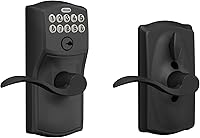
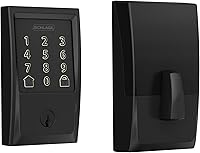
A light-up keypad helps at night, and the models here illuminate when you tap them or press a key.
What you need before you change a keypad lock code
You need the current programming code and a few minutes with the door open. That's the only real requirement, though having the original instructions nearby saves guesswork.
The programming code is separate from the user codes you give to family. It's the code that lets you edit or delete user codes, and Kwikset includes one on the Powerbolt 250 and the SmartCode 260.
On many locks it's a longer number than a normal entry code.
Check the installation guide first. If you can't find the guide, open the battery cover on the interior side.
Factory codes are often printed on a label there or in the battery compartment.
How to change a keypad door lock in six steps
Program the lock, set the new code, test it, then delete any old codes you no longer want. These six steps match how most keypad deadbolts work.
- Open the door and keep it open while you work.
- Enter the programming code to get into programming mode.
- Press the user-code button or key sequence your model uses.
- Type the new 4 to 8 digit code, then type it again.
- Test the new code once with the door still open.
- Delete any old user codes you don't want active.
If the lock doesn't accept the new code, wait a minute before trying again. Three wrong entries in a row trigger an intrusion alert on several models, which sounds an alarm and disables the keypad briefly.
That protection is useful, but it can slow you down if you mistype.
How do you enter programming mode?
Enter the programming code, then press the programming button if your lock has one. On many keypad deadbolts the programming code goes in first, followed by a dedicated button or a short key sequence.
Watch for the confirmation. A beep or a light means the lock is ready for the next step.
If nothing happens, the code may be wrong or the lock may be in vacation mode, which disables the keypad entirely. Kwikset models like the Powerbolt 250 and SmartCode 260 both have a vacation mode you turn on and off.
The Schlage BE365 works a little differently. It ships with 2 pre-programmed codes and lets you add up to 19 more, using the six-digit code you create to manage them right at the keypad.
The lock has no motorized bolt; you press the Schlage button and turn the outside thumbturn to lock from outside.
How many user codes should you set up?
Set up one code per person who needs regular access, plus a one-time code for guests or workers. That keeps the list short enough to manage and makes deleting a code simple when someone leaves.
Code counts vary a lot by model. The Kwikset Powerbolt 250 takes up to 25 user codes, 5 one-time user codes and 1 programming code.
The Kwikset SmartCode 260 doubles the room with 50 user codes and 10 one-time codes, which suits rental units and large families.
One-time codes are the smart part. You hand a contractor or dog sitter a code that works once, and you don't have to remember to delete it later.
For a small household, a handful of regular codes plus a couple of one-time codes covers most situations.
Skip personal codes like birthdays or the last four digits of a phone number. Neighbors and delivery drivers can guess those, and so can anyone who watches you type.
Who should choose the Powerbolt 250?
Choose the Powerbolt 250 if you want a straightforward keypad deadbolt with room for 25 users. It covers a family plus regular visitors without getting complicated.
Kwikset gives it auto lock options from 30 seconds to 10 minutes, so the door relocks itself if someone forgets. It runs on 4 AA batteries and Kwikset says they last at least 12 months.
The keypad lights up when you tap it, which matters for evening arrivals. SmartKey re-keying lets you match it to your existing KW1 key in seconds.
How do you add a new user code?
Get into programming mode, choose an open user slot, then enter the new code twice. The double entry is what confirms it; most locks won't save a single entry.
Take your time with the digits. A misread keypress sends you back to the start, and on some models the keypad pauses after repeated errors.
The Schlage BE365 uses four-digit codes, while Kwikset models generally accept codes in a similar short range.
Test the code before you close the door. Lock from outside with the new code, then open.
If it fails, re-enter programming mode and try again with a simpler code. Write the new code down somewhere safe and out of sight of the door, such as a locked drawer.
Don't tape it to the frame or hide it in a fake rock; those are the first places a burglar checks.
Who should choose the SmartCode 260?
Choose the SmartCode 260 if you manage a lot of codes, like a rental, an Airbnb or a big household. It handles 50 user codes and 10 one-time codes.
Kwikset rates it Grade 2 BHMA, which the company says is up to 2.5 times stronger than Grade 3 locks. The keypad also carries Microban protection, which Kwikset says keeps the surface 99.9% cleaner than an unprotected one.
Auto lock runs from 30 seconds to 10 minutes. The deadbolt is a round shape in a Venetian Bronze finish.
How do you delete an old code?
Enter programming mode, select the user slot you want to clear, then confirm the deletion. You don't need to know the old code to remove it.
Delete codes in order when you can. Note which slot each person uses when you set up the codes; a short list in your phone's notes keeps it straight.
Otherwise you end up deleting codes at random and testing each one.
Change codes when a tenant moves out, when a contractor finishes a job and when a key goes missing. A keypad lock's real advantage is that you can retire access without re-keying the whole house.
A code left active is the same as a lost key. If the lock won't let you delete a code, the programming code may have been changed by someone else.
In that case, a factory reset is the way back in. See our guide to how an electronic door lock works for what the reset clears.
Who should choose the Schlage BE365?
Choose the Schlage BE365 if you want a simple keypad deadbolt with a key backup and long battery life. It's a good fit for a front door where you want keyless entry without an app.
Schlage rates it Grade 2/AAA and backs it with a limited lifetime mechanical warranty and a 3-year electronics warranty. The silicone-coated numbers light up when pressed, so night entry is easy.
The deadbolt fits either a 2-3/8 in or 2-3/4 in backset. If app access matters, look at our picks for a smart door handle lock instead.
How do you reset a keypad lock when the code is lost?
Factory reset the lock, then set fresh codes. A reset clears the programming code and every user code, so you start from the factory defaults.
On many keypad deadbolts the reset button sits under the battery cover on the interior side. Hold it for the time the instructions give, then re-enter the factory programming code from the guide.
Some models reset through a key sequence instead.
Try the factory programming code from the battery label before you wipe the lock. If you bought the house recently, the previous owner may have changed the code, and a reset is the only way to take control.
After a reset, set a new programming code right away and then add your user codes. Don't leave the factory code active; it's published in every guide for that model.
Once you're set up, a keypad deadbolt comparison can help if you want to add a matching lock at the back door.
How often should you change the code?
Change codes when access changes, not on a fixed calendar. A move-out, a lost key or a finished renovation is the trigger; there's no security benefit to rotating codes for their own sake.
A few habits keep the list clean. Review your user codes twice a year and delete any you can't tie to a person.
Use one-time codes for deliveries and short jobs so nothing lingers. If you rent the property, change the code between every tenant.
Test each new code the day you set it; a code that fails at the door is worse than no code. Keep a physical key somewhere secure as a backup, since every keypad lock here includes one.
For a first keypad lock, compare models with our guide to how to choose a keyless door lock. The main differences are code capacity, battery type and whether the lock has a motorized bolt or a manual thumbturn.
The bottom line on changing a keypad code
The pattern is the same on almost every keypad lock: programming code, new user code, confirm, then delete what you no longer need. Once you've done it once, the second change takes a minute.
Pick the Powerbolt 250 for a family-sized code list, the SmartCode 260 for rentals and large households, or the Schlage BE365 for a keypad deadbolt with a long battery life. Whichever you own, set the code while the door is open, test it, and keep a key as backup.
That's how to change a keypad door lock without locking yourself out.
Frequently asked questions
How do I change the code on a keypad door lock?
Enter programming mode with the current programming or master code, press the button your lock uses for user codes, then type the new 4 to 8 digit code and enter it again. The lock confirms with a beep or a light.
Where do I find the default programming code?
It's printed in the installation guide and on a label inside the battery cover on many models. Kwikset and Schlage both ship with a factory programming code, so look there first.
What if I forgot the programming code?
You'll usually need to reset the lock to factory settings, which clears every user code. On many models that means removing the battery cover and holding the reset button for a set time.
Can I change the code without deleting everyone else's?
Yes. Adding a new user code leaves the others in place.
Delete only the codes you want gone, such as a former renter's or a contractor's.