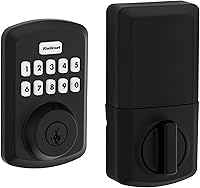
Kwikset SmartCode 270 Keypad Deadbolt Review: Worth It? (October 2026)
The Kwikset SmartCode 270 suits households that want a keypad deadbolt with up to 50 user codes, 10 one-time codes and adjustable auto-lock. Its backlit touchpad and Grade 2 BHMA certification make it a strong fit for frequent keyless entry, though app or remote control features aren't specified.
On this page (8 sections)
- What does the Kwikset SmartCode 270 offer?
- How does the SmartCode 270 compare with other keypad deadbolts?
- Is the SmartCode 270 secure enough for a home?
- How should you set its auto-lock and Vacation Mode?
- What should you know about batteries and upkeep?
- What should you check before installing the SmartCode 270?
- What common SmartCode 270 mistakes should you avoid?
- Should you choose the SmartCode 270?
The Kwikset SmartCode 270 is a keypad deadbolt for households that want keyless entry and room for many user codes. Its backlit touchpad, one-time codes and adjustable auto-lock make it a practical fit for a main entry where several people come and go.
The SmartCode 270 is a standalone keypad choice in the information available here. App or remote control features aren't specified, so it may not fit if you need to lock the door from a phone or check its status while away.
What does the Kwikset SmartCode 270 offer?
The SmartCode 270 combines a light-up touchpad, flexible code management and automatic relocking. Its code capacity is useful when you want separate access for household members and temporary visitors without sharing one permanent code.
Kwikset SmartCode 270: Best for busy households

- Up to 50 user codes
- 10 one-time codes
- Auto-lock options from 30 seconds to 10 minutes
- Grade 2 BHMA certified
A keypad deadbolt with broad code capacity, one-time access and selectable auto-lock timing. It suits households that want keyless entry at the door without relying on app or network features.
Pros
- Up to 50 user codes and 10 one-time codes
- Grade 2 BHMA certified
- Backlit keypad and configurable auto-lock
- SmartKey lets you re-key to a KW1 key
Cons
- App or remote control features are not specified
- Uses 4 AA batteries, which are not included
You can assign up to 50 user codes, 10 one-time codes and a programming code used to edit or delete codes. After 3 consecutive incorrect entries, the lock sounds an alarm and disables the keypad for 1 minute.
Vacation Mode temporarily disables keypad operation while you're away. SmartKey Security lets you re-key the lock to a KW1 key, which can help if you want it to match another lock that uses the same keyway.
Who should choose the SmartCode 270?
Choose it if multiple people need separate entry codes, you want to give temporary access, or you often want the door to relock on its own. The backlit touchpad also suits an entry that gets used after dark.
Skip it if you need app control, remote opening, activity records or smart-home connections. Those features aren't specified for this lock, so compare connected options in our guide to smart locks versus keypad locks.
How does the SmartCode 270 compare with other keypad deadbolts?
The SmartCode 270 is the strongest fit here for code capacity and one-time access, while the alternatives suit different entry preferences. The SmartCode 260 shares its main code and auto-lock options, and the Yale and Schlage models trade capacity for features such as a backup key or button-based control.
| Lock | Code capacity | Auto-lock | Notable difference |
|---|---|---|---|
| Kwikset SmartCode 270 | 50 user codes, 10 one-time codes | 30 seconds, 1, 3, 5 or 10 minutes | Grade 2 BHMA certified; backlit touchpad |
| Kwikset SmartCode 260 | 50 user codes, 10 one-time codes | 30 seconds, 1, 3, 5 or 10 minutes | Traditional design; Microban protection |
| Yale Digital Keypad Deadbolt | Up to 20 entry codes | Yes | Backup key; Grade 3 BHMA certified |
| Schlage BE365 Keypad Deadbolt | Up to 19 codes | Not specified | Grade 2/AAA rating; button-based locking |
Pick the SmartCode 260 if you prefer its traditional design or Venetian Bronze finish. It shares the 270's stated code capacity and auto-lock choices, with Microban protection as another point of difference.
The Yale suits you if you want a basic keypad deadbolt with a backup key and no app, phone setup or Wi-Fi. Choose the Schlage if its button and thumbturn action appeals to you and its smaller code capacity is enough.
Read our SmartCode 270 vs 260 comparison for a closer look. Our keyless door lock guide explains the main lock types if you're still deciding between a keypad-only and connected model.
Is the SmartCode 270 secure enough for a home?
The SmartCode 270 has Grade 2 BHMA certification for security, durability and finish. That makes it a useful choice if certification is part of your deadbolt search, while the door, frame and installation still matter to how well an entry is secured.
Its keypad response to repeated incorrect entries adds a short barrier against attempts to guess a code. Use codes that aren't easy to infer from public details, such as birthdays or street numbers, and remove access when a user no longer needs it.
Give each regular user a separate code so you can delete access without changing everyone else's. Keep the programming code private, since it controls changes to user codes.
SmartKey Security lets you re-key the lock to a KW1 key. If you want it to match an existing door lock, check that the other lock uses a KW1 keyway before you buy.
For broader entry security considerations, see whether keyless door locks are safe to use.
How should you set its auto-lock and Vacation Mode?
Set auto-lock to match how quickly your household can close the door after entering. The five choices range from 30 seconds to 10 minutes, giving you a short delay for quick entry or a longer window for carrying groceries and helping children inside.
A short delay is convenient when people tend to forget to lock up, but it can engage before someone is ready if the door stays open. Start with a delay that gives everyone time to enter and close the door, then adjust it if the timing feels impractical.
Check the bolt alignment while you're home. Auto-lock can't compensate for a door that sticks, a door that doesn't close fully or a bolt that doesn't line up with its strike plate.
Vacation Mode temporarily disables keypad use. Before activating it, decide how trusted visitors or anyone who may need access will get in, then restore normal keypad operation when you return.
What should you know about batteries and upkeep?
Kwikset states that the SmartCode 270's 4 AA alkaline batteries last at least 12 months; batteries aren't included. Keep spare alkaline batteries available and follow the lock's instructions when replacing them.
Don't wait for a busy morning to learn how the battery compartment opens. After changing batteries, secure the interior cover and confirm that the keypad and deadbolt respond normally.
For routine use, tap the touchpad to light the numbers before entering a code in low light. Avoid saying or entering codes where someone nearby can easily observe them.
Our guide to smart lock battery life offers more ways to plan for battery changes and reduce the chance of an unexpected lockout.
What should you check before installing the SmartCode 270?
Kwikset says the SmartCode 270 installs with a screwdriver and includes BILT 3D instructions with voice, text and animation. Check the door fit before you start, since a straightforward installation still depends on compatible measurements and a deadbolt that moves freely.
Confirm the door thickness, backset and borehole against Kwikset's installation instructions. Then check that the existing deadbolt moves smoothly by hand and that the strike plate lines up with the bolt.
The package includes the exterior touchpad, interior lock, latch, mounting bracket, strike plate, keys, SmartKey tool and screws. Lay out those parts before removing existing hardware so you can see what is included and keep the work area organized.
Use our door measurement guide to confirm fit before ordering. If the door has a nonstandard bore or existing hardware, compare its dimensions with Kwikset's instructions before beginning.
What common SmartCode 270 mistakes should you avoid?
The most common setup mistakes are choosing an inconvenient auto-lock delay, reusing one code for everyone and skipping the door-fit check. Each can create extra hassle even when the lock itself fits your needs.
Don't give guests the programming code when a user code will do. Use one-time access for temporary visitors when appropriate, and delete or change regular codes as access needs change.
Don't assume SmartKey will match any existing key. It can re-key to a KW1 key, so confirm your other lock uses that keyway before planning to use one key for both.
Avoid setting the shortest auto-lock delay without checking how your household enters. Test the timing while you're home and confirm the door closes and the bolt engages cleanly.
Should you choose the SmartCode 270?
Choose the Kwikset SmartCode 270 if you want a keypad deadbolt for many regular users, temporary access and adjustable automatic locking. Its Grade 2 BHMA certification, illuminated touchpad and KW1 re-keying option add useful flexibility for a busy household.
Choose the SmartCode 260 if its traditional style, finish or Microban protection is a better match for your door. Pick Yale for a backup key and basic no-app operation, or Schlage if you prefer button-based locking and don't need as many codes.
If phone access or remote control is a must, explore Kwikset smart locks with connected features. If a keypad deadbolt is enough, compare more options in our keypad deadbolt guide.
Frequently asked questions
Does the Kwikset SmartCode 270 need Wi-Fi?
The SmartCode 270 works as a keypad deadbolt, and Wi-Fi or app control features aren't specified. You enter codes at the door and can set auto-lock timing on the lock.
Choose a connected model if you need remote access or phone-based lock status.
How many codes can the SmartCode 270 store?
The SmartCode 270 supports up to 50 user codes, 10 one-time user codes and 1 programming code. That gives a household room for regular users and temporary access.
Remove codes you no longer need, and keep the programming code in a secure place.
Does the SmartCode 270 lock automatically?
Yes. You can set the SmartCode 270 to lock after 30 seconds, 1 minute, 3 minutes, 5 minutes or 10 minutes.
Pick a delay that gives people time to enter and close the door, then confirm the door closes and the bolt aligns with its strike plate.
Is the Kwikset SmartCode 270 hard to install?
Kwikset says the SmartCode 270 installs with a screwdriver and includes BILT 3D interactive instructions. Check that your door and existing deadbolt opening fit the lock before starting.
The door measurement guide covers the measurements to confirm.