11 Best Kwikset Smart Locks (October 2026)
The best Kwikset smart locks include the Kwikset SmartCode 270 for flexible keypad access, the Kwikset Powerbolt 250 for straightforward keypad entry, and the Kwikset Halo Select for Wi-Fi and Matter access.
On this page (13 sections)
- How to choose the best Kwikset smart lock
- Kwikset SmartCode 270: Best for flexible keypad access
- Kwikset Powerbolt 250: Best for straightforward keypad entry
- Kwikset Halo Select: Best for Wi-Fi and Matter access
- Kwikset SmartCode 260: Best for traditional keypad style
- Kwikset HomeConnect 620: Best for Z-Wave hub households
- Kwikset SmartCode 917: Best for a keypad entry lever
- Kwikset Halo Wi-Fi: Best for remote app access
- Kwikset SmartCode 955 Lever: Best for high-traffic lever doors
- Kwikset Halo Select Plus: Best for Apple Home Key entry
- Kwikset HomeConnect 918: Best for a Z-Wave touchscreen
- Kwikset Aura Reach: Best for Matter over Thread
- Which Kwikset smart lock should you choose?
The best Kwikset smart lock for most homes is the SmartCode 270, a keypad deadbolt with Grade 2 BHMA certification, up to 50 user codes and adjustable auto-lock. For app control, choose Halo Select; for Z-Wave hub setups, look at HomeConnect 620 or 918.
Kwikset's range includes keypad-only locks, Wi-Fi models, Matter-enabled locks and Z-Wave options. This roundup compares their entry methods, code capacity and connection options to help you find a lock that fits your door and smart home.
If you're deciding between code-only and connected entry, our guide to smart locks vs keypad locks explains the tradeoffs. Before you choose a deadbolt, use our door measurement guide to check thickness and backset.
Our picks at a glance
-
1

-
2

-
3
- 4
 Best for traditional keypad styleCheck it
 - 5
 Best for Z-Wave hub householdsCheck it
 - 6
 Best for a keypad entry leverCheck it
 - 7
 Best for remote app accessCheck it
 - 8
 Best for high-traffic lever doorsCheck it
 - 9
 Best for Apple Home Key entryCheck it
 - 10
 Best for a Z-Wave touchscreenCheck it
 - 11
 Best for Matter over ThreadCheck it
How to choose the best Kwikset smart lock
The best Kwikset smart lock depends on whether you need keypad codes, remote app control or integration with a hub you already own. Start with the door format, then match the connection to your household.
We compared the entry methods, code capacity, connectivity, auto-lock options and certifications stated for each model. Our score weighs specs, features and buyer feedback against what you're shopping for, with higher scores going to the closest fit for the main use.
A deadbolt is the usual choice for an exterior entry door, while a lever lock can fit an interior door or a door where a lever is already part of the setup. For keypad-only access without app control, compare the SmartCode 270, Powerbolt 250 and SmartCode 260.
Connected models need a compatibility check. Halo Select and Halo Wi-Fi use Wi-Fi, while HomeConnect 620 and 918 require a compatible Z-Wave hub.
Learn more in our guide to whether smart locks need a hub.
| Product | Best for | Entry | Codes | Connectivity | Our score |
|---|---|---|---|---|---|
| Kwikset SmartCode 270 | flexible keypad access | Touchpad and key | 50 user, 10 one-time | Keypad lock | 8.6 |
| Kwikset Powerbolt 250 | straightforward keypad entry | Keypad and key | 25 user, 5 one-time | Keypad lock | 8.2 |
| Kwikset Halo Select | Wi-Fi and Matter access | Touchscreen, app, geofencing | Up to 250 | Wi-Fi and Matter | 8.0 |
| Kwikset SmartCode 260 | traditional keypad style | Keypad and key | 50 user, 10 one-time | Keypad lock | 8.0 |
| Kwikset HomeConnect 620 | Z-Wave hub households | Touchscreen and key | Up to 250 | Z-Wave; hub required | 8.0 |
| Kwikset SmartCode 917 | a keypad entry lever | Touchpad lever and key | Up to 30 | Keypad lock | 7.8 |
| Kwikset Halo Wi-Fi | remote app access | Touchscreen, app, geofencing | Up to 250 | Wi-Fi | 7.7 |
| Kwikset SmartCode 955 Lever | high-traffic lever doors | Keypad lever and key | 30 user, 1 one-time | Keypad lock | 7.5 |
| Kwikset Halo Select Plus | Apple Home Key entry | Touchscreen, app, Apple Home Key | Up to 250 | Wi-Fi and Matter | 7.4 |
| Kwikset HomeConnect 918 | a Z-Wave touchscreen | Touchscreen and key | Up to 250 | Z-Wave; hub required | 7.3 |
| Kwikset Aura Reach | Matter over Thread | Touchpad, app, geofencing | Up to 250 | Matter over Thread and Bluetooth | 7.1 |
Kwikset SmartCode 270: Best for flexible keypad access
Kwikset SmartCode 270: Best for flexible keypad access
- Grade 2 BHMA certification
- Up to 50 user codes and 10 one-time codes
- Adjustable auto-lock
- Backlit touchpad
The SmartCode 270 combines a backlit touchpad with up to 50 user codes, one-time codes and adjustable auto-lock. It suits households that want keyless entry without app connectivity.
Pros
- Grade 2 BHMA certification
- Up to 50 user codes
- Auto-lock has 5 timing options
Cons
- No app or smart home connectivity
- Uses 4 AA batteries, not included
The SmartCode 270 is the top pick for households that want code entry and room for many regular users. Its touchpad supports up to 50 user codes and 10 one-time codes, so you can give recurring access to family and temporary access to a visitor.
Auto-lock can be set for 30 seconds, 1 minute, 3 minutes, 5 minutes or 10 minutes. It also has Vacation Mode, which temporarily disables the keypad, and an alarm that sounds and disables the keypad for 1 minute after 3 incorrect code entries.
The lock has a Grade 2 BHMA certification for security, durability and finish. Kwikset says the four AA alkaline batteries last at least 12 months, and they are not included.
Choose this if a keypad deadbolt covers your needs and you want the larger code capacity in this group. Read our SmartCode 270 review for a closer look at its setup and features.
Kwikset Powerbolt 250: Best for straightforward keypad entry
Kwikset Powerbolt 250: Best for straightforward keypad entry
- Up to 25 user codes and 5 one-time codes
- Adjustable auto-lock
- Backlit keypad
- SmartKey re-keying
The Powerbolt 250 covers the basic keypad job with adjustable auto-lock, one-time codes and a backlit keypad. Its code capacity is lower than the SmartCode 270's.
Pros
- Auto-lock offers 5 timing options
- One-time codes for guests
- SmartKey re-keying
Cons
- Holds fewer codes than the SmartCode 270
- No app connectivity
The Powerbolt 250 gives you keypad access with a simpler code allowance than the SmartCode 270. It supports up to 25 user codes and 5 one-time codes, with a backlit keypad for low-light entry.
Its auto-lock schedule offers the same five intervals, from 30 seconds to 10 minutes. Vacation Mode can disable keypad operation while you're away, and the lock sounds an alarm and disables the keypad for 1 minute after 3 incorrect entries.
This model also supports SmartKey re-keying to a KW1 key. Kwikset says its four AA alkaline batteries last at least 12 months, and they're not included.
Installation requires a screwdriver.
Choose the Powerbolt if you want code entry and auto-lock without needing 50 user codes. If you want to compare keypad deadbolts beyond Kwikset, see our guide to the best keypad deadbolts.
Kwikset Halo Select: Best for Wi-Fi and Matter access
Kwikset Halo Select: Best for Wi-Fi and Matter access
- Built-in Wi-Fi and Matter
- Remote app control
- Up to 250 access codes
- Works with Amazon Alexa, Apple Home and Google Home
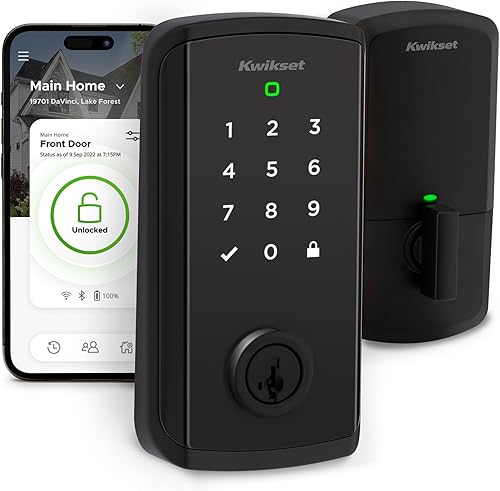
Halo Select adds remote app control, geofencing and Matter to keypad access. It suits buyers who want connected control without a separate hub.
Pros
- Wi-Fi with no hub required
- Up to 250 temporary, scheduled or permanent codes
- Works with major smart home platforms
Cons
- Depends on Wi-Fi for remote access
- More features than a keypad-only buyer may need
Halo Select is the connected pick for buyers who want remote control through Wi-Fi and smart home integration through Matter. It works with Amazon Alexa, Apple Home and Google Home, and doesn't require a separate hub for Wi-Fi control.
You can enter with the touchscreen, use the Kwikset app or enable geofencing for auto-open as you approach home. The app supports up to 250 temporary, scheduled or permanent access codes, plus an event log and alerts for invalid code attempts or lock tampering.
This model suits households that want app access and shared codes across several people. If you want to understand Matter's role before choosing a platform, read what Matter means for smart locks.
Kwikset SmartCode 260: Best for traditional keypad style
Kwikset SmartCode 260: Best for traditional keypad style
- Grade 2 BHMA certification
- Up to 50 user codes and 10 one-time codes
- Adjustable auto-lock
- SmartKey re-keying
The SmartCode 260 offers the same stated user and one-time code capacity as the 270, with a keypad design and SmartKey re-keying. It fits buyers who prefer that style.
Pros
- Grade 2 BHMA certification
- Up to 50 user codes
- SmartKey re-keying
Cons
- No app or smart home connectivity
- Uses 4 AA batteries, not included
The SmartCode 260 is a keypad deadbolt with up to 50 user codes and 10 one-time codes, matching the SmartCode 270's stated code capacity. It also includes adjustable auto-lock, Vacation Mode, an intrusion alert and SmartKey re-keying.
Its Grade 2 BHMA certification covers security, durability and finish. The lock uses four AA alkaline batteries, which Kwikset says last at least 12 months, and they are not included.
Choose it if its keypad design and finish suit your door better than the 270. Our SmartCode 270 vs 260 comparison lays out the differences between the two models.
Kwikset HomeConnect 620: Best for Z-Wave hub households
Kwikset HomeConnect 620: Best for Z-Wave hub households
- Z-Wave 700 Long Range
- S2 encryption
- Up to 250 user codes
- Ring Alarm compatible with a Ring Alarm hub
The HomeConnect 620 is built for a compatible Z-Wave hub setup, with up to 250 codes and S2 encryption. It can connect with Ring Alarm through a Ring Alarm smart hub.
Pros
- Z-Wave 700 Long Range
- Up to 250 user codes
- Grade 2 BHMA certification
Cons
- Requires a compatible hub, sold separately
- Remote features depend on the hub setup
HomeConnect 620 suits a home that already uses a compatible Z-Wave hub. It supports Z-Wave 700 Long Range and S2 encryption, and Kwikset says it can connect with Ring Alarm through a Ring Alarm smart hub.
The touchscreen lock allows up to 250 user codes and adjustable auto-lock. It also has Grade 2 BHMA certification and SmartKey re-keying.
Kwikset says its four AA alkaline batteries last at least 12 months, and they are included.
The hub requirement is the key buying check. Choose this model if you want Z-Wave integration and have a compatible hub, then compare it with our best Z-Wave smart locks roundup.
Kwikset SmartCode 917: Best for a keypad entry lever
Kwikset SmartCode 917: Best for a keypad entry lever
- Electronic lever instead of deadbolt
- Up to 30 user codes
- Auto-lock, passage and disable-passage modes
- Reversible door handing
The SmartCode 917 is a keypad lever for doors where a lever format fits the job. It has up to 30 codes and three entry modes, including passage mode.
Pros
- Three entry modes
- Reversible for left- or right-hand doors
- 9V battery included
Cons
- Lever format instead of deadbolt
- No app connectivity
SmartCode 917 is a keypad lever rather than a deadbolt, making it the format-specific choice in this list. It supports up to 30 user codes, including optional one-time codes, and the lever can be set to auto-lock, passage or disable-passage mode.
The lever is reversible for left- or right-hand doors. Kwikset says it runs on one 9V battery for up to 3 years, and the product is BHMA certified AAA for residential security, durability and finish.
Choose the 917 when a keypad lever suits the door or room better than a deadbolt. For more lever-style options, see our guide to smart door handle locks.
Kwikset Halo Wi-Fi: Best for remote app access
Kwikset Halo Wi-Fi: Best for remote app access
- Built-in Wi-Fi with no hub required
- Remote app control and activity history
- Up to 250 access codes
- Works with Amazon Alexa and Google Home
Halo Wi-Fi supports remote app control, activity history and guest codes without a separate hub. It fits buyers whose priority is access from away from home.
Pros
- No hub required
- Up to 250 access codes
- Auto-lock and intrusion alerts
Cons
- Remote control relies on Wi-Fi
- Does not include Matter support
Halo Wi-Fi is a touchscreen deadbolt with built-in Wi-Fi, so remote app control doesn't require a separate hub. The Kwikset app can lock and open the door, show activity history and share temporary, scheduled or permanent access codes.
It supports up to 250 access codes, geofencing and auto-lock, and works with Amazon Alexa and Google Home. Kwikset specifies that it fits doors 1-3/8 to 1-3/4 in thick, with an adjustable deadbolt backset from 2-1/8 to 2-3/4 in, so measure your door before choosing it.
Pick Halo Wi-Fi if remote access and guest code management are priorities. If your main goal is to keep a smart lock supplied with power reliably, our guide to smart lock battery life covers the factors to plan for.
Kwikset SmartCode 955 Lever: Best for high-traffic lever doors
Kwikset SmartCode 955 Lever: Best for high-traffic lever doors
- Tested to 500,000 cycles
- Up to 30 user codes and 1 one-time code
- Auto-lock and passage modes
- Grade 2 BHMA certification
The SmartCode 955 is a light commercial keypad lever tested to 500,000 cycles. Its modes and code setup suit busy entryways that use a lever rather than a deadbolt.
Pros
- Tested to 500,000 cycles
- Three lock modes
- 3-year battery life claim
Cons
- Light commercial lever format
- No app connectivity
The SmartCode 955 is a light commercial keypad lever built for frequent use. Kwikset says it has been tested to 500,000 cycles and gives a battery life of at least 3 years from one included 9V battery.
It supports up to 30 user codes and one one-time code. Its modes include auto-lock, passage and a setting that disables the turnpiece to keep the lock in auto-lock mode.
This lever has Grade 2 BHMA certification and SmartKey re-keying. Consider it for a busy entryway where a lever format and frequent operation matter more than app access.
Kwikset Halo Select Plus: Best for Apple Home Key entry
Kwikset Halo Select Plus: Best for Apple Home Key entry
- Apple Home Key via NFC
- Wi-Fi and Matter
- Remote app control
- Up to 250 access codes
Halo Select Plus adds Apple Home Key tap entry with an iPhone or Apple Watch, alongside Wi-Fi and Matter. Consider it when that tap-to-open option matters to your household.
Pros
- Apple Home Key via NFC
- Wi-Fi and Matter
- Up to 250 guest codes
Cons
- More connected features to set up
- No user code capacity beyond 250
Halo Select Plus adds Apple Home Key support to Wi-Fi and Matter. With NFC, you can tap an iPhone or Apple Watch to open, or use the touchscreen, Kwikset app or geofence auto-open.
The app supports up to 250 temporary, scheduled or permanent access codes, along with remote control and smart home integration. It works with Amazon Alexa, Apple Home and Google Home.
Choose this model if Apple Home Key is a key part of how you want to enter. For other compatible options, compare our best Apple Home Key smart locks.
Kwikset HomeConnect 918: Best for a Z-Wave touchscreen
Kwikset HomeConnect 918: Best for a Z-Wave touchscreen
- Z-Wave 700 Long Range
- S2 encryption
- Up to 250 user codes
- Ring Alarm and SmartThings compatibility
The HomeConnect 918 pairs a touchscreen with Z-Wave 700 Long Range and up to 250 user codes. It suits buyers whose smart home already uses a compatible hub.
Pros
- Up to 250 user codes
- S2 encryption
- Grade 2 BHMA certification
Cons
- Requires a compatible hub, sold separately
- Remote features depend on the hub setup
HomeConnect 918 combines a touchscreen deadbolt with Z-Wave 700 Long Range and S2 encryption. It supports up to 250 user codes and is designed to integrate with compatible hubs, including Ring Alarm and SmartThings systems.
Auto-lock offers five timing settings from 30 seconds to 10 minutes. Kwikset says four AA alkaline batteries last at least 12 months, and they are included.
The lock carries Grade 2 BHMA certification.
The main decision is whether your current hub supports the lock. Choose the 918 for a touchscreen Z-Wave setup, or the 620 if its style and finish suit your door better.
Kwikset Aura Reach: Best for Matter over Thread
Kwikset Aura Reach: Best for Matter over Thread
- Matter over Thread and Bluetooth
- Up to 250 user codes
- Geofence auto-open
- Proximity wakeup keypad
Aura Reach brings Matter over Thread and Bluetooth to a backlit touchpad lock. Its proximity wakeup lights the screen as you reach for the keypad.
Pros
- Matter over Thread
- Bluetooth code management
- SmartKey re-keying
Cons
- Remote features depend on the connected setup
- No Wi-Fi stated
Aura Reach combines Matter over Thread with Bluetooth and a backlit touchpad with proximity wakeup. The keypad lights as you reach for it, and the Kwikset app can manage codes and share access over Bluetooth when nearby.
The lock supports up to 250 user codes and geofence auto-open. Its stated compatibility includes Apple Home, Amazon Alexa, Google Home and SmartThings through Matter.
Choose Aura Reach if you want a keypad lock built around Matter over Thread and nearby Bluetooth management. Check that your smart home setup supports the connection method you plan to use.
Which Kwikset smart lock should you choose?
Choose the SmartCode 270 for keypad entry, a large code allowance and Grade 2 certification. Pick Halo Select for Wi-Fi and Matter, HomeConnect 620 or 918 for a compatible Z-Wave hub, and Halo Select Plus if you want Apple Home Key.
For a lever rather than a deadbolt, compare SmartCode 917 and 955. If you're still deciding between connected control and simple keypad access, start with our guide to choosing a keyless door lock.
Our top 3 picks at a glance
-
1
-
2
-
3
Frequently asked questions
Which Kwikset smart lock is best for most homes?
The SmartCode 270 is a strong fit if you want keypad entry, up to 50 user codes and adjustable auto-lock without a hub or app. Choose Halo Select if you want Wi-Fi and Matter, or a HomeConnect model if your home already has a compatible Z-Wave hub.
Check your door measurements and existing smart home setup before choosing.
Do Kwikset smart locks need Wi-Fi?
No. Keypad-only models such as the SmartCode 270 and Powerbolt 250 provide code entry without Wi-Fi.
Halo models include Wi-Fi for app features, while HomeConnect models use Z-Wave and require a compatible hub.
Pick the connection type that matches how you want to manage access.
What is the difference between Kwikset Halo and HomeConnect?
Halo models use built-in Wi-Fi for remote app access, and Halo Select also supports Matter. HomeConnect models use Z-Wave and need a compatible hub for smart home control.
The right choice depends on whether you already have a hub and which smart home system you use.
Can a Kwikset smart lock replace a door handle?
Some Kwikset picks here are keypad levers, including SmartCode 917 and SmartCode 955. The other models are deadbolts, so they fit a different door hardware layout.
Check whether your door needs a lever, a deadbolt, or both before buying.


