7 Best Retrofit Smart Locks (October 2026)
The best retrofit smart locks include the Level Bolt for hidden upgrades, the Yale Approach for unchanged deadbolts, and the SwitchBot Lock Ultra for fingerprint households.
On this page (10 sections)
- Which best retrofit smart lock fits your door and routine?
- Best retrofit smart lock picks for different needs
- How do you choose the best retrofit smart lock?
- What should you measure and inspect before buying?
- Do retrofit smart locks need a hub or bridge?
- How do you set up and care for a retrofit smart lock?
- What common retrofit smart lock mistakes should you avoid?
- Are retrofit smart locks a good choice for renters?
- Which best retrofit smart lock should you choose?
- Sources
The best retrofit smart lock for most people is Level Bolt if they want to keep existing keys and exterior hardware. This guide to the best retrofit smart lock options compares discreet upgrades, deadbolt-preserving designs, keypad access and fingerprint entry.
A retrofit lock adds smart control from the inside of the door, but each model handles the existing deadbolt differently. Some replace interior parts; others attach over the thumb turn, so start by identifying what you have and how much you want to change.
For a plain-language explanation, read what a retrofit smart lock is. Before you buy, use our door measurement guide to check the dimensions and lock parts that can affect fit.
Our picks at a glance
-
1

-
2

-
3
Which best retrofit smart lock fits your door and routine?
Level Bolt fits buyers who want to retain the visible hardware, while Yale Approach is the clearest choice for leaving the full existing deadbolt in place. Other picks add fingerprints, codes, Apple Home Key or app control with different hub needs.
| Product | Best for | Our score |
|---|---|---|
| Level Bolt | hidden upgrades | 8.0 |
| Yale Approach | unchanged deadbolts | 7.7 |
| SwitchBot Lock Ultra | fingerprint households | 7.6 |
| Yale August Wi-Fi Smart Lock | codes and prints | 7.5 |
| Aqara U200 | Apple Home Key | 7.4 |
| August Smart Lock Pro | August bridge bundles | 7.0 |
| August Smart Lock | Bluetooth control | 6.9 |
Best retrofit smart lock picks for different needs
The right choice depends on the installation method, the way your household enters and the connected home equipment you already use. Check compatibility first, then choose the access features that solve a real need.
Level Bolt: Best for hidden upgrades
- Replaces interior deadbolt hardware
- Keeps existing keys and exterior hardware
- Matter-over-Thread remote access requires a hub and border router
- Fits most American standard doors
Level Bolt swaps the interior deadbolt hardware while leaving the existing lock and keys in place. Its app access and Matter-over-Thread features suit buyers who want a smart upgrade without changing the visible hardware.
Pros
- Keeps the existing exterior lock and keys
- DIY installation with a screwdriver
- Matter-over-Thread support
Cons
- Remote access requires a Matter-over-Thread hub and border router
- Compatibility should be checked against the existing deadbolt
Level Bolt suits you if you want the front of the door to look the same after the upgrade. It replaces the interior deadbolt hardware, while your existing keys and exterior hardware remain in use.
It's designed for most American standard exterior doors, with a 1.75 in door thickness noted. Level describes the DIY installation as a screwdriver job without drilling or hardwiring, but advises checking its compatibility guide for your existing deadbolt first.
The Level Home app supports access sharing, activity history and lock status. Matter-over-Thread remote control requires a compatible hub and border router, so this pick makes the most sense if you're willing to add those components for remote access.
Choose Level Bolt when keeping the outside appearance and current keys is your priority. If you're weighing different types of keyless entry, see how to choose a keyless door lock.
Yale Approach: Best for unchanged deadbolts
- Installs on the inside of the door
- Does not replace the existing deadbolt
- Yale Connect Wi-Fi Bridge included
- Activity Feed and virtual keys in Yale Access app
Yale Approach mounts inside the door without replacing the deadbolt, so your keys stay as a backup. Yale Connect is included for remote app access and activity tracking.
Pros
- Leaves existing deadbolt in place
- Includes Wi-Fi bridge
- Unlimited virtual keys
Cons
- Interior lock and bridge add components to the setup
- Keypad is an optional upgrade
Yale Approach is the better fit if you want smart control without replacing the existing deadbolt. It installs inside the door, leaving your current keys available as a backup and the exterior hardware unchanged.
The Yale Access app handles locking, opening, virtual keys and activity history. Yale Connect Wi-Fi Bridge is included for remote app control, and the lock also offers auto-open and auto-lock.
Choose Approach if leaving the deadbolt itself intact matters more than adding a keypad right away. The Yale Keypad is a separate upgrade, so this isn't the pick for households that want code entry included from day one.
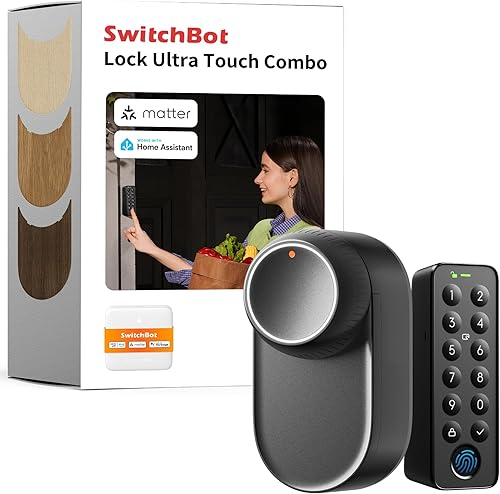
SwitchBot Lock Ultra: Best for fingerprint households
- Fingerprint recognition
- Supports up to 100 fingerprints
- Matter support
- Hub mini included for some integrations
SwitchBot Lock Ultra combines retrofit installation with a fingerprint reader and several smart home options. Its Apple HomeKit support depends on pairing it with a SwitchBot Hub mini.
Pros
- Fingerprint entry supports up to 100 fingerprints
- Matter support
- Hub mini included
Cons
- Compatibility varies by door lock type
- Some integrations require a hub
SwitchBot Lock Ultra is the fingerprint-focused option for a household that wants multiple stored prints. It supports up to 100 fingerprints and Matter, and a Hub mini is included in the package.
Fit depends on the lock type and region. SwitchBot says it works with most standard US apartment door locks; Jimmy Proof and Mortise locks need a separately sold Accessory Kit, while European locksets require the correct version or mount.
Choose this model if fingerprint entry is central to your routine and your door matches the compatibility guidance. Skip it if your lock needs an accessory kit you don't want to source, or if you want a simpler setup with fewer platform dependencies.
Yale August Wi-Fi Smart Lock: Best for codes and prints

- Installs inside without replacing the deadbolt
- Yale Keypad Touch included
- Built-in Wi-Fi
- Fingerprint, code, app and auto-open options
This Yale August setup keeps the existing deadbolt and adds a keypad with fingerprint entry. Built-in Wi-Fi supports remote app access without an additional hub.
Pros
- Keeps existing keys and deadbolt
- Fingerprint and custom code access
- Built-in Wi-Fi
Cons
- Keypad needs to be mounted within Bluetooth range
- More access methods mean more setup choices
Yale August Wi-Fi Smart Lock suits households that want fingerprint and code entry while keeping the existing deadbolt. It includes Yale Keypad Touch and supports app access, custom codes, auto-lock and auto-open.
Built-in Wi-Fi supports remote app access without an extra hub. The keypad can be placed anywhere within Bluetooth range of the lock, so check that a convenient mounting spot is available before choosing it.
Pick this setup when household members want a choice of fingerprint, code or phone access. Skip it if you only need basic app control, since the extra keypad options add setup choices you may not use.
Aqara U200: Best for Apple Home Key

- Keeps the existing deadbolt
- Apple Home Key support requires a Thread-enabled Apple hub
- Fingerprint, passcode, Bluetooth and physical key access
- Rechargeable interior battery
Aqara U200 adds smart access to a compatible existing deadbolt, with Apple Home Key, fingerprint and passcode options. Apple features require a compatible Thread-enabled Apple hub.
Pros
- Several entry options
- Keeps the existing deadbolt
- Rechargeable interior battery
Cons
- Apple Home Key requires a compatible hub
- Door and tailpiece compatibility need checking
Aqara U200 is for households that want Apple Home Key alongside other ways to enter. It supports fingerprint, passcode, Bluetooth and physical keys, while Apple Home Key and Apple features require a Thread-enabled Apple hub.
The retrofit design keeps the existing deadbolt, but fit depends on the tailpiece shape and dimensions. Aqara advises checking compatibility with the interior cover removed, so compare the parts before installation rather than assuming every thumb turn will fit.
The interior lock body has a rechargeable battery, while the exterior keypad uses four AAA batteries. Choose U200 if your Apple setup is compatible and you want multiple entry methods; skip it if you don't have the required hub and don't plan to add one.
August Smart Lock Pro: Best for August bridge bundles

- Keeps existing lock and keys
- August Connect Wi-Fi Bridge included
- Auto-Lock and Auto-Open
- DoorSense sensor
August Smart Lock Pro keeps the existing lock and keys while adding app control. The bundle includes the August Connect Wi-Fi Bridge and DoorSense sensor.
Pros
- Keeps existing keys
- Wi-Fi bridge included
- Auto-Lock and Auto-Open
Cons
- Check door measurements and fit before choosing
- Older setup may be less suitable if you want newer access methods
August Smart Lock Pro works for buyers who want to keep existing keys and prefer a package with the Wi-Fi bridge included. DoorSense is also part of the bundle, alongside auto-lock and auto-open features.
Check your door's backset, cross bore and thickness before buying, because the fit depends on those measurements. This is a practical option if the included bridge matches your remote access needs, but shoppers focused on newer entry methods such as fingerprint access should choose a different pick.
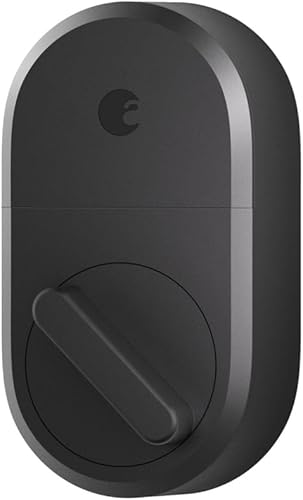
August Smart Lock: Best for Bluetooth control
- Attaches to existing deadbolt inside the door
- Keeps existing keys
- Bluetooth app control
- Wi-Fi bridge sold separately
August Smart Lock attaches inside the door and leaves the existing deadbolt and keys in place. Remote access and Alexa integration require a separately sold Wi-Fi Connect Bridge.
Pros
- Retains existing lock and keys
- Installs with a screwdriver
- Auto-Lock and Auto-Open
Cons
- Wi-Fi bridge sold separately
- Check door dimensions and compatibility
August Smart Lock is a straightforward retrofit for people who want to keep their current deadbolt and use app control nearby. It attaches inside the door and supports auto-open and timed auto-lock.
The core setup uses Bluetooth and the August app. A Wi-Fi Connect Bridge is sold separately for remote access or Alexa integration, and the keypad is also a separate purchase.
Choose this model if Bluetooth control is enough for your routine and you want to retain your keys. Skip it if you expect remote control or keypad entry from the box, since those require additional equipment.
How do you choose the best retrofit smart lock?
Choose a retrofit lock by matching its installation style to your deadbolt, then make sure its entry methods and connectivity fit your household. A low-friction setup starts with fit, not with a feature list.
First decide whether you want to replace interior deadbolt parts or mount a unit over the thumb turn. Level Bolt replaces interior hardware; Yale Approach and the August models mount inside without replacing the existing deadbolt.
Aqara U200 also retains the deadbolt, but its tailpiece must fit.
Next, list the ways people need to enter. Phone app access may be enough for a household that always carries phones.
A keypad helps when family, guests or service people need codes, while fingerprints can reduce the need to remember or share codes.
Then check remote access. Built-in Wi-Fi, an included bridge and a separate hub are different ownership costs and setup steps, even when all lead to app control from away.
Match the lock to your current smart home platform, and verify the required hub or border router before ordering.
Finally, decide how much backup matters. Keeping a mechanical key gives you a familiar fallback, but it doesn't remove the need to maintain batteries and understand the app.
Keep a backup entry method available and make sure household members know how to use it.
What should you measure and inspect before buying?
Measure the door and inspect the existing deadbolt before choosing a retrofit model. These locks depend on the parts already installed, so a model that fits a common door may still be incompatible with a particular thumb turn or tailpiece.
Confirm the door thickness and the lock's exact fit instructions. For the Level Bolt, the stated fit includes most American standard doors at 1.75 in thick; Aqara U200 calls for a compatible tailpiece shape and dimensions.
Yale Approach and August also ask buyers to check door compatibility.
Remove interior covers only when you're ready to inspect the lock and can safely put them back. Take a clear photo of the deadbolt and thumb turn, note the measurements, and compare those details against the manufacturer's fit guide before purchasing.
Our door measurement guide explains the checks, and how electronic door locks work gives background on how the motor and access controls operate. If your existing hardware doesn't match a retrofit lock's requirements, a full keypad deadbolt may be simpler; compare options in our keypad deadbolt guide.
Do retrofit smart locks need a hub or bridge?
Some retrofit locks need a hub or bridge for remote control, while others include one or have Wi-Fi built in. Identify the connection path before buying so you don't expect away-from-home control from a local Bluetooth setup.
Level Bolt's Matter-over-Thread remote access requires a hub and border router. Yale Approach includes Yale Connect, while Yale August Wi-Fi has built-in Wi-Fi.
The standard August Smart Lock needs a separate Wi-Fi Connect Bridge for remote access or Alexa integration.
SwitchBot and Aqara features depend on the platform and hub pairing. For example, SwitchBot's Apple HomeKit support depends on a Hub mini, and Aqara Apple Home Key requires a Thread-enabled Apple hub.
If you already own a smart home hub, check its supported platform and radio features before assuming it will work. For a broader explanation, read whether smart locks need a hub.
How do you set up and care for a retrofit smart lock?
Set up the lock only after confirming the hardware fit, then test every access method while the door is open. This catches alignment or app setup problems before a locked door makes them harder to solve.
Follow the model's installation guide in order and keep the original deadbolt parts, screws and any removed cover together. Tighten hardware evenly, avoid forcing the thumb turn, and check that the bolt moves freely by hand before using the motor.
Install the app, pair the lock and configure only the access methods you plan to use. Add household members deliberately, set auto-lock only after confirming the door closes consistently, and try the backup key or alternate method before relying on the new setup.
Make battery checks part of ordinary home care. Replace or recharge power sources when the app or lock indicates they are low, and keep the right battery type on hand.
For planning, see how long smart lock batteries last.
What common retrofit smart lock mistakes should you avoid?
The most common mistakes are buying before checking compatibility, assuming every model includes remote access equipment and turning on automation before confirming the door closes reliably. Each is avoidable with a short pre-purchase and setup check.
Don't treat “retrofit” as a universal fit guarantee. Confirm the lock type, thumb-turn shape, tailpiece and door measurements against the specific model's guidance.
Don't confuse local app control with remote control. Bluetooth access may work when you're near the door, while access from away can require Wi-Fi, a bridge or a compatible hub and border router.
Don't enable auto-lock until you know how it behaves with your door and household routine. Check that the door is fully closed, that the bolt can move without resistance and that everyone who needs access understands the backup method.
Don't assume a keypad or fingerprint reader is included just because a lock supports that feature in some configuration. Yale Approach's keypad is a separate upgrade, and the standard August Smart Lock needs separate equipment for remote access and keypad entry.
Are retrofit smart locks a good choice for renters?
A retrofit lock can suit renters when it keeps the existing deadbolt and can be removed without permanent changes. Aqara describes U200 as removable, while Yale Approach and August install on the interior side of the door.
Check your lease and get permission when required before changing lock hardware. Keep the original parts and installation instructions, and confirm you can restore the door when you move.
For a renter, the best fit is often the lock whose installation method is easy to reverse and whose access options match the household. If a model requires removing or altering parts you can't restore, choose another approach.
Which best retrofit smart lock should you choose?
Choose Level Bolt if keeping the visible hardware and existing keys is your main goal, or Yale Approach if you want the deadbolt itself to remain untouched. Choose Yale August Wi-Fi Smart Lock for built-in Wi-Fi with keypad and fingerprint entry, and Aqara U200 if Apple Home Key is central to your compatible setup.
SwitchBot Lock Ultra is the fingerprint choice for households with a compatible door and a use for its stored prints. August Smart Lock Pro fits buyers who want the Wi-Fi bridge in the bundle, while the standard August Smart Lock is for basic Bluetooth app control.
Measure first, then match the lock to your access routine and hub requirements. For a final comparison of phone control and keypad access, read smart lock vs keypad lock.
Sources
Our top 3 picks at a glance
-
1
-
2
-
3
Frequently asked questions
What is the difference between a retrofit smart lock and a full replacement?
A retrofit smart lock adds a motor or smart control to the inside of an existing deadbolt, so you can often keep your current keys and exterior hardware. A full replacement removes the old lock and installs a new deadbolt assembly.
Check each model's fit requirements because retrofit designs do not fit every door.
Do retrofit smart locks keep your existing keys?
Many retrofit locks are designed to keep your existing keys, including Level Bolt, Yale Approach and the August models here. Level Bolt replaces interior deadbolt hardware, while Yale Approach and August install on the inside without replacing the deadbolt.
Confirm the installation method and compatibility for your lock before buying.
Can a retrofit smart lock work remotely?
Yes, some retrofit locks support remote control through a bridge or smart home hub. Yale Approach includes Yale Connect, while Level Bolt's Matter-over-Thread remote access requires a hub and border router.
Other models may need a separate hub or bridge, so check what your setup requires.
How do you check if a retrofit smart lock will fit?
Start by confirming that your door has a compatible deadbolt and that the interior thumb turn or hardware can be removed as required. Measure the door and compare the deadbolt shape and dimensions with the lock's fit guide.
Our door measurement guide walks through the checks.


