Do You Need a Hub for a Smart Lock?
Smart locks don't always need a hub. A lock with built-in Wi-Fi can connect directly to your router, while some Z-Wave and Matter over Thread features require a compatible hub or border router.
On this page (6 sections)
Smart locks don't always need a hub. A Wi-Fi lock can connect directly to your router, while Z-Wave locks and Matter over Thread features may need compatible smart home equipment.
The key is to match the lock's connection to the way you plan to use it. Remote access, voice control, and smart home automations can depend on different connections, even on the same lock.
Do smart locks need a hub for remote access?
Not always: built-in Wi-Fi can provide remote access without a separate hub. A lock using Z-Wave or Matter over Thread may need a compatible hub or border router for app control away from home.
A hub is a device that connects smart home products to a network or app. It may also help devices using a protocol such as Z-Wave or Thread communicate with other devices.
Read the connection details closely. “Works with an app” doesn't tell you whether the lock connects directly to Wi-Fi, needs a bridge, or only supports local Bluetooth control.
How does built-in Wi-Fi compare with a hub?
Built-in Wi-Fi connects the lock to your router directly; a hub connects devices through a compatible smart home system. Which setup fits depends on the lock's protocol and the features you want.
With built-in Wi-Fi, the lock may offer remote control through its app without another box. The router's Wi-Fi band and distance from the lock can still matter.
A hub can be useful when you want a Z-Wave or Thread lock to join a broader smart home setup. It adds another device to configure, and the hub must support the lock's protocol.
For a wider look at app-based options, see how smart locks differ from keypad locks. A keypad can still work as a local entry method even when app or hub features aren't available.
Can one lock support both Wi-Fi and a hub connection?
Yes, some locks offer more than one connection path, but each path can have different requirements. A lock may use built-in Wi-Fi for app access and Matter over Thread for smart home integration.
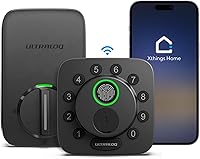
The Ultraloq Bolt SE supports built-in Wi-Fi for remote app control without a hub. Its Matter over Thread access and integration features require a compatible Thread Border Router and Matter-supported app.
That means a hub isn't required for every feature on a multi-protocol lock. Check which connection you plan to use and whether it supports the remote or automation feature you care about.
Which smart locks work without a separate hub?
A lock with built-in Wi-Fi can offer remote app access without a separate hub. Check the supported network band, router distance, and other requirements before choosing one.
The Philips Wi-Fi Smart Deadbolt uses built-in Wi-Fi and supports remote control through a smartphone app without an extra hub. It supports 2.4 GHz Wi-Fi, and the router should be within 65 ft of the lock for better remote control.
The Ultraloq Bolt SE also has built-in Wi-Fi for remote app control without a hub. It supports 2.4 GHz Wi-Fi, and the router should be within 70 ft for optimal connectivity.
These options suit readers who want app access without adding a hub. For battery considerations, see how long smart lock batteries last.
When does a smart lock need a hub?
A lock needs a compatible hub when its connection protocol or selected feature depends on one. Z-Wave control and Matter over Thread are two common examples.
The Kwikset HomeConnect 620 uses Z-Wave Long Range and requires a compatible Z-Wave hub. Its Ring Alarm integration requires a Ring Alarm smart hub.
Before buying a hub-based lock, confirm that the hub supports the lock's protocol and the features you want. If you already own a smart home system, check its supported devices and whether it can act as a Thread Border Router.
For more on one of these protocols, read what a Z-Wave smart lock is or what Matter means for smart locks.
What should you check before buying a smart lock?
Check the connection type, hub requirement, and remote access path before you choose a lock. Then confirm that your router or smart home equipment meets the lock's stated requirements.
Use this short checklist:
- Connection: Is the lock Wi-Fi, Z-Wave, Thread, Bluetooth, or a combination?
- Hub: Does the feature you want need a specific hub or Thread Border Router?
- Remote access: Can you control the lock away from home through built-in Wi-Fi or a hub?
- Network: Does it support your Wi-Fi band, and can your router reach the door?
- Smart home system: Does the lock work with your preferred app, voice assistant, or automation setup?
If you want a simple app connection, built-in Wi-Fi may fit. If you want a Z-Wave or Matter over Thread setup, choose the compatible hub as part of the plan.
Are smart locks with hubs worth it?
A hub is useful when it connects the lock to the smart home features you want. It adds little value if you won't use those features and a direct Wi-Fi lock already meets your needs.
Choose a built-in Wi-Fi lock for remote app control without a separate hub, after checking network requirements. Choose a Z-Wave lock if your compatible hub is already part of your setup, or a Matter over Thread lock if you have a suitable border router and Matter app.
For weather exposure at an exterior door, read whether smart locks are weatherproof. To compare the standards and systems behind smart home connections, start with what Matter means for smart locks.
Frequently asked questions
Do smart locks need a hub?
No, many smart locks connect directly to Wi-Fi or work over Bluetooth for nearby control. A hub is needed for some features or protocols, such as Z-Wave control or Matter over Thread remote access.
Check which connection and functions you want before choosing a lock.
Can a Wi-Fi smart lock work without a hub?
Yes, a lock with built-in Wi-Fi can connect to your home network without a separate hub. Remote control still depends on a compatible network and the lock's requirements, such as supported Wi-Fi band and router distance.
What kind of hub does a Matter over Thread lock need?
It needs a compatible Matter over Thread hub that works as a Thread Border Router, plus a Matter-supported app. Confirm that the hub supports the lock's protocol and the smart home system you plan to use.
Does a Z-Wave smart lock need a hub?
A Z-Wave lock needs a compatible Z-Wave hub to connect with a smart home system. Some features, including app control through an alarm system, may also depend on a specific hub, so check compatibility before buying.