What Does Matter Mean on a Smart Lock?
Matter helps compatible smart locks work across smart home platforms from different brands. Check the lock’s connection type and hub needs, since Matter over Thread requires a compatible Thread Border Router for remote access.
On this page (7 sections)
Matter helps compatible smart locks work with smart home platforms from different brands, such as Apple Home, Google Home, Alexa, and SmartThings. Check whether the lock uses Wi-Fi or Matter over Thread, because a Matter-over-Thread lock may need a compatible Thread Border Router for remote access.
Matter doesn't mean every lock has the same features or works without extra equipment. Check the lock's app support, wireless connection, and hub requirements before choosing one.
What does Matter do for a smart lock?
Matter is a shared smart home standard that helps compatible devices work across platforms. With a Matter smart lock, you may be able to control it through a compatible app or connect it to automations alongside other Matter devices.
The standard can reduce the need to choose a lock based only on the phone or smart speaker brand you already use. Support varies by lock, app, and connection type, so confirm the setup you want.
Matter doesn't define how you enter the door. A lock may use a keypad, fingerprint, app, or physical key, depending on its design.
Is Matter the same as Thread?
No. Matter is a device standard, while Thread is a wireless network.
Some smart locks run Matter over Thread, so they use both together.
Thread devices can communicate through a low-power mesh network. A Thread Border Router connects that network to your home network and smart home setup.
A lock that uses Matter over Thread may require a compatible Thread Border Router for remote control through a Matter app. Other locks use Wi-Fi and may connect without a separate hub.
Does a Matter smart lock need a hub?
It depends on the lock's connection. A Wi-Fi lock can connect through your home router, while a Matter-over-Thread lock may need a compatible Thread Border Router for remote access.
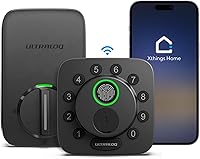
For example, Kwikset Halo Select uses Wi-Fi and supports Matter without a hub. The Ultraloq Bolt SE has built-in Wi-Fi app control and Matter-over-Thread remote access, which requires a compatible Thread Border Router.
If you're unsure what equipment your setup needs, read whether a smart lock needs a hub. Check that the hub supports Thread and the smart home platform you want to use.
What should you check before buying?
Match the lock's connection and features to your home setup. Check these details before buying:
- Smart home platform: Confirm the lock supports the app you plan to use, such as Apple Home or Google Home.
- Wireless connection: Find out whether it uses Wi-Fi, Thread, or both.
- Hub requirements: Check whether remote access or platform integration needs a compatible hub.
- Entry methods: Matter doesn't tell you whether a lock has a keypad, fingerprint reader, or backup key.
- Remote access: Confirm how the lock connects when you're away from home.
The Ultraloq Bolt SE has built-in Wi-Fi app control and remote access through Matter over Thread. Its Matter-over-Thread connection requires a compatible Thread Border Router.
For another way to compare smart home standards, see what a Z-Wave smart lock is. If Apple Home is your main platform, our guide to Apple Home Key explains that separate entry feature.
How do Matter and Wi-Fi compare?
Matter describes cross-platform device support; Wi-Fi describes a wireless connection. A smart lock can use Wi-Fi, Matter over Thread, or both, so those labels answer different questions.
A Wi-Fi lock may connect directly to your home network for app access. A Thread lock uses a Thread Border Router to reach your home network and supported apps.
The Level Bolt replaces the deadbolt inside your existing lock while letting you keep its keys and exterior hardware. Remote access through Matter over Thread requires a compatible hub and Thread Border Router.
Before choosing a retrofit model, check that your existing deadbolt is compatible. Our guide to retrofit smart locks explains how this style differs from replacing the full lock.
What does Matter support not guarantee?
Matter support doesn't guarantee every feature will work in every app or setup. Features such as remote access, notifications, and voice control depend on the lock, its connection, and compatible devices.
A lock may support Matter but still need a Thread Border Router for remote access. A platform may also show only the functions it supports for that device.
Check setup requirements for both the lock and your smart home platform. For a wider comparison of supported models, see the best Matter smart locks.
How do you choose the right Matter smart lock?
Choose a Wi-Fi model if you want app control through your router and don't want to add a hub. Choose a Matter-over-Thread model if you have, or plan to get, a compatible Thread Border Router and want to connect the lock with supported smart home platforms.
Then compare entry methods and hardware. The Halo Select is a Wi-Fi and Matter deadbolt; the Bolt SE combines built-in Wi-Fi with Matter over Thread; the Level Bolt is a retrofit option that keeps existing exterior hardware.
Check platform compatibility and hub needs first, then choose the lock that fits your door and preferred entry method. If you want to compare more options, start with our Matter smart lock picks.
Frequently asked questions
What does Matter mean on a smart lock?
Matter is a smart home standard that helps compatible devices from different brands work with platforms such as Apple Home, Google Home, Alexa, and SmartThings. A Matter label doesn't tell you which wireless connection a lock uses or whether it needs a hub, so check those details before buying.
Does a Matter smart lock need a hub?
Some do and some don't. A Matter-over-Thread lock needs a compatible Thread Border Router for remote access through a Matter app, while Kwikset Halo Select supports Wi-Fi control without a hub.
Check the lock's connection requirements and the smart home platform you plan to use.
Is Matter the same as Thread?
No. Matter is the standard that helps smart home devices work across platforms, while Thread is a low-power wireless network some Matter devices use.
A lock can use Matter over Thread, which means you need a compatible Thread Border Router for the connection.
Will a Matter smart lock work with Apple Home?
Some Matter smart locks work with Apple Home, but compatibility depends on the lock and its connection setup. Confirm the exact lock supports Apple Home and check whether it requires a Thread Border Router.
Matter support alone doesn't guarantee every feature works in every app.