10 Best Matter Smart Locks (October 2026)
The best Matter smart locks include the Ultraloq Bolt SE for flexible entry, the Aqara U100 for Apple households, and the Aqara U400 for hands-free arrivals.
On this page (14 sections)
- How we chose these Matter smart locks
- Which Matter smart lock fits your home?
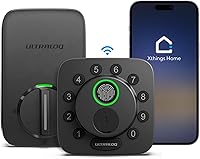
- 1. Ultraloq Bolt SE: Best for flexible entry
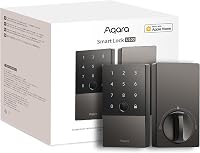
- 2. Aqara U100: Best for Apple households
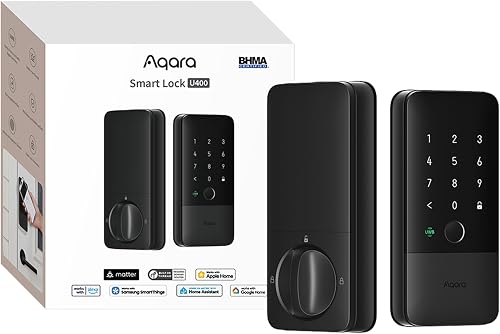
- 3. Aqara U400: Best for hands-free arrivals
- 4. Kwikset Halo Select: Best for hub-free Wi-Fi
- 5. Level Bolt: Best for existing hardware
- 6. Aqara U50: Best for keypad access
- 7. Aqara U300: Best for lever doors
- 8. Yale Matter Deadbolt: Best for Google homes
- 9. Kwikset Aura Reach: Best for local code control
- 10. Philips Matter Fingerprint Deadbolt: Best for fingerprint entry
- How do you choose the best Matter smart lock?
- Which Matter smart lock should you choose?
The Ultraloq Bolt SE is the best Matter smart lock for most homes because it combines built-in Wi-Fi with Matter over Thread and offers fingerprint, code, app, voice and key entry. For Wi-Fi remote access without a hub, choose the Kwikset Halo Select; for Apple Home Key and fingerprint access, consider the Aqara U100.
Matter helps smart home devices from different brands work together, but the connection behind that support matters. Some locks use Matter over Thread and need a compatible hub, while the Halo Select offers remote control over Wi-Fi without one.
If you're new to the standard, start with what Matter means for smart locks. If you are comparing wireless choices, our Z-Wave vs Wi-Fi smart lock comparison explains how those connections differ.
Our picks at a glance
-
1
-
2
-
3
How we chose these Matter smart locks
The best Matter smart lock depends on the entry methods, connection and hub setup you need. We compared those features, ecosystem support, door format and access controls across these 10 picks.
Our scores reflect how well each lock's stated features match common Matter-lock needs. A lock with useful local entry or simpler remote access may suit more homes than one that depends on a specific hub for its smart features.
Matter support does not mean that every feature works on every platform. Check whether your preferred app, hub and phone support the lock's particular setup, especially for Apple Home Key, UWB and remote access.
Which Matter smart lock fits your home?
The Ultraloq Bolt SE is the highest-scoring choice here, while the other models serve more specific needs. Compare the connection and entry method you care about, then check whether your door can accept the lock format.
| Product | Best for | Connection | Entry | Lock type | Our score |
|---|---|---|---|---|---|
| Ultraloq Bolt SE | flexible entry | Built-in 2.4 GHz Wi-Fi; Matter over Thread needs a compatible hub | Fingerprint, passcode, app, voice control and 2 mechanical keys | Deadbolt | 8.5 |
| Aqara U100 | Apple households | Bluetooth and Zigbee | Home Key, fingerprint, password and mechanical key | Deadbolt | 8.4 |
| Aqara U400 | hands-free arrivals | Matter over Thread; compatible hub required for each ecosystem | UWB, Apple Home Key, fingerprint, passcode, app, NFC card and physical key | 8.3 | |
| Kwikset Halo Select | hub-free Wi-Fi | Wi-Fi and Matter | App, touchscreen code and geofence auto-unlock | Keypad deadbolt | 8.0 |
| Level Bolt | existing hardware | Bluetooth and Matter | Existing key and Level Home app | Retrofit deadbolt | 8.0 |
| Aqara U50 | keypad access | Bluetooth and Zigbee | Home Key, keypad, passwords and physical key | Deadbolt | 7.9 |
| Aqara U300 | lever doors | Matter over Thread; compatible hub required | Home Key, fingerprint, keypad and app | Lever lock | 7.6 |
| Yale Matter Deadbolt | Google homes | Bluetooth and Matter | Phone, keypad, voice command and backup key | Keypad deadbolt | 7.1 |
| Kwikset Aura Reach | local code control | Bluetooth and Matter | Touchpad, Bluetooth app and geofence auto-unlock | Deadbolt | 7.1 |
| Philips Matter Fingerprint Deadbolt | fingerprint entry | Matter over Thread; compatible hub required | Fingerprint, passcode, app, voice and physical key | Deadbolt | 6.9 |
1. Ultraloq Bolt SE: Best for flexible entry
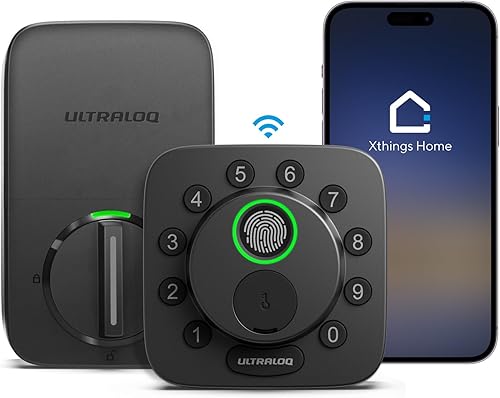
Ultraloq Bolt SE: Best for flexible entry
- Built-in Wi-Fi and Matter over Thread
- Fingerprint, passcode, app and key entry
- Up to 50 fingerprints and 50 access codes
A broad set of entry methods and built-in Wi-Fi make this the most flexible pick here. Matter remote access through Apple Home or another compatible app requires a Thread Border Router.
Pros
- Built-in Wi-Fi remote control without a hub
- Supports up to 50 fingerprints and codes
- Mechanical keys included
Cons
- Matter over Thread needs a compatible hub
- Wi-Fi supports 2.4 GHz only
The Ultraloq Bolt SE earns the top spot because it combines built-in Wi-Fi with Matter over Thread and offers several ways to enter. Fingerprint, passcode, app, voice control and two mechanical keys give household members options for different routines.
It supports up to 50 fingerprints and 50 access codes, with permanent, scheduled or temporary sharing. Built-in Wi-Fi enables remote control without a hub; remote access through Apple Home or another Matter app requires a Thread Border Router.
The lock uses 2.4 GHz Wi-Fi, and ULTRALOQ recommends keeping the router within 70 ft. Its four AA batteries are not included, and ULTRALOQ says battery life can reach 18 months.
Choose it if you want a broad mix of entry methods and direct Wi-Fi control, with the option to add Matter over Thread. Skip it if Home Key tap access is your main requirement, or if you want a lock that uses only a single connection method.
2. Aqara U100: Best for Apple households
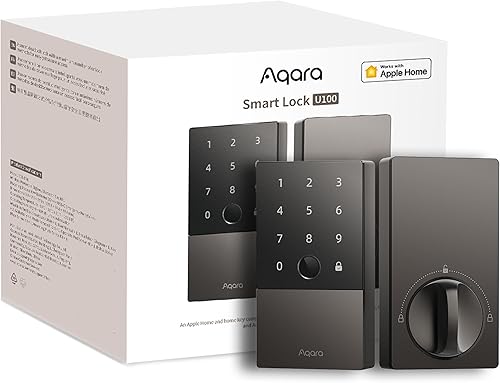
Aqara U100: Best for Apple households
- Apple Home Key tap access
- Fingerprint reader supports up to 50 prints
- Aqara Zigbee hub needed for remote passwords
The U100 centers on Apple Home Key and fingerprint entry. Its Aqara Zigbee hub is needed for remotely configurable passwords and broader third-party integrations.
Pros
- Apple Home Key works with iPhone or Apple Watch
- Up to 50 fingerprints
- Mechanical key and emergency USB-C charging
Cons
- Aqara Zigbee hub needed for remote passwords and integrations
- NFC card sold separately
The Aqara U100 suits an Apple household that wants Home Key and fingerprint entry in a deadbolt. Tap a supported iPhone or Apple Watch to enter, or use its fingerprint reader, which supports up to 50 fingerprints.
Remotely configurable passwords through the Aqara Home app require an Aqara Zigbee 3.0 hub. Sharing Apple Home Keys requires an Apple Home Hub, so check the hub needs for the features you expect to use.
Aqara says its four included AA batteries can last up to 8 months. The lock also has an emergency USB-C charging port, a mechanical key and a zinc-alloy body with an IP65 rating.
Choose it if Apple Home Key and fingerprint access are your priorities. Skip it if you want remote passwords without an Aqara hub, or if you need Matter support without adding compatible Aqara equipment.
3. Aqara U400: Best for hands-free arrivals
Aqara U400: Best for hands-free arrivals
- Matter over Thread
- UWB approach opening with supported Apple devices
- Home Key, fingerprint, passcode and physical key
The U400 offers several entry methods, including UWB approach opening with supported Apple devices. Ecosystem features require a Thread-enabled Matter controller.
Pros
- Multiple entry options
- UWB hands-free access with supported devices
- Rechargeable removable battery
Cons
- UWB requires a Thread-enabled Apple Home hub and supported Apple devices
- NFC card sold separately
The Aqara U400 stands out for UWB approach opening. It uses a supported Apple device's position, direction and approach to decide when to open, so you can enter without touching the lock when your hands are full.
UWB needs a Thread-enabled Apple Home hub and a supported iPhone or Apple Watch. Other entry options include Apple Home Key, fingerprint, touchscreen passcode, voice control, app access, an NFC card or a physical key; each smart home platform needs its own Thread-enabled Matter controller.
The removable rechargeable battery can last up to 6 months per charge, according to Aqara. You can recharge it through USB-C without taking the lock offline, and its exterior has an IP65 rating.
Choose it if hands-free entry is valuable and your Apple devices meet the UWB requirements. Skip it if you don't want to depend on a compatible Apple hub and device, or if a simpler keypad and fingerprint lock covers your needs.
4. Kwikset Halo Select: Best for hub-free Wi-Fi
Kwikset Halo Select: Best for hub-free Wi-Fi
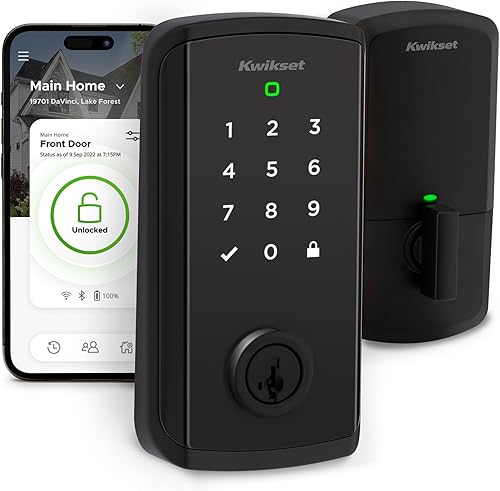
- Wi-Fi and Matter
- Remote control without a hub
- Touchscreen codes and geofence auto-open
Halo Select pairs Wi-Fi remote control with Matter support and doesn't require a hub for remote access. It also offers temporary, scheduled or permanent codes.
Pros
- Remote Wi-Fi control without a hub
- Supports up to 250 access codes
- Alerts for invalid code attempts or tampering
Cons
- Geofence opening may not suit every household
- Touchscreen entry is the stated keyless method
The Kwikset Halo Select is the clearest pick if you want remote control over Wi-Fi without a separate hub. It also supports Matter and works with Amazon Alexa, Apple Home and Google Home.
Entry options include the Kwikset app, touchscreen and geofence auto-open. You can share up to 250 temporary, scheduled or permanent codes, and receive alerts for invalid code attempts or tampering.
Choose it if remote access without planning around a Thread Border Router is your priority. Skip it if you want a fingerprint reader or prefer not to use geofence opening; the stated keyless entry options are app, touchscreen code and geofence.
5. Level Bolt: Best for existing hardware
Level Bolt: Best for existing hardware

- Retrofit bolt replaces inner deadbolt hardware
- Keeps existing keys and exterior hardware
- Matter over Thread remote access needs a hub
Level Bolt replaces the inner deadbolt mechanism while keeping existing keys and visible hardware. Check your deadbolt's compatibility before choosing this retrofit design.
Pros
- Keeps existing keys and lock appearance
- Works with up to 3 smart home platforms at once
- DIY install uses a screwdriver
Cons
- Designed for most American standard doors, not every deadbolt
- Remote access through Matter over Thread needs a hub
Level Bolt replaces the inner deadbolt hardware while preserving your existing keys and visible lock hardware. That retrofit design suits a door where you want smart access without changing its exterior appearance.
The Level Home app provides lock control, access sharing and activity history. Matter-over-Thread remote access needs a compatible hub and Border Router, and the lock can integrate with up to three smart home platforms at once.
Level says Bolt fits most American standard exterior doors, but it won't fit every deadbolt. Check the product guides and your existing lock's compatibility before buying.
Choose it when keeping your current key and hardware is central to the decision. Skip it if your door preparation is incompatible or you want a keypad or fingerprint reader on the outside of the door.
6. Aqara U50: Best for keypad access
Aqara U50: Best for keypad access
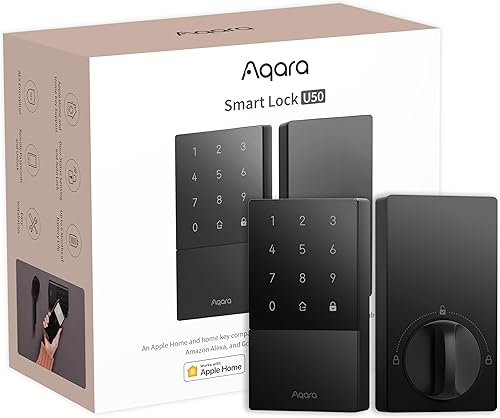
- Apple Home Key tap access
- Keypad and local one-time passwords
- Matter support with a compatible Aqara hub
The U50 combines a keypad with Apple Home Key and local one-time passwords. Matter support depends on a compatible Aqara hub.
Pros
- Apple Home Key works with iPhone or Apple Watch
- Local one-time passwords can work without internet
- Rekeyable cylinder
Cons
- Compatible Aqara hub needed for Matter support
- NFC card sold separately
The Aqara U50 pairs keypad entry with Apple Home Key, so you can enter a code or tap a supported iPhone or Apple Watch. It also supports local one-time passwords for visitors when internet access is unavailable.
A compatible Aqara hub is required for Matter support, and an Aqara Zigbee hub is needed for remotely configurable passwords and third-party integrations. A locksmith can rekey its cylinder to match an existing five-pin key.
The U50 runs on four included AA batteries, which Aqara says can last up to 6 months. It also has a USB-C emergency charging port and an IPX5 rating.
Choose it if you want a keypad, Home Key and local visitor codes in one deadbolt. Skip it if you want built-in Wi-Fi or don't want to add an Aqara hub for Matter support.
7. Aqara U300: Best for lever doors
Aqara U300: Best for lever doors

- Lever lock with Matter over Thread
- Apple Home Key support with a compatible Apple hub
- Fingerprint, keypad and app access
The U300 is a lever lock for doors where a deadbolt isn't the right format. Check your door's hole layout, backset and thickness before buying.
Pros
- Lever format with reversible handle
- Supports up to 25 fingerprints
- Up to 10 months on 4 AA alkaline batteries
Cons
- Not a deadbolt replacement
- Matter over Thread needs a compatible hub
The Aqara U300 is a lever lock for a door prepared for a lever, not a standard deadbolt opening. It supports Matter over Thread, Apple Home Key, fingerprint, keypad and app entry.
Its fingerprint reader supports up to 25 prints. Aqara says four AA alkaline batteries can last up to 10 months, and the lock has two USB-C ports for backup power.
Before buying, compare your door's thickness, backset and hole size with Aqara's fit requirements. The handle can be reversed, but the U300 is not a drop-in alternative to a deadbolt.
Choose it if your door needs a lever lock and your smart home has a compatible Thread-enabled hub. Skip it if your door needs a deadbolt or you have not confirmed the measurements.
8. Yale Matter Deadbolt: Best for Google homes
Yale Matter Deadbolt: Best for Google homes
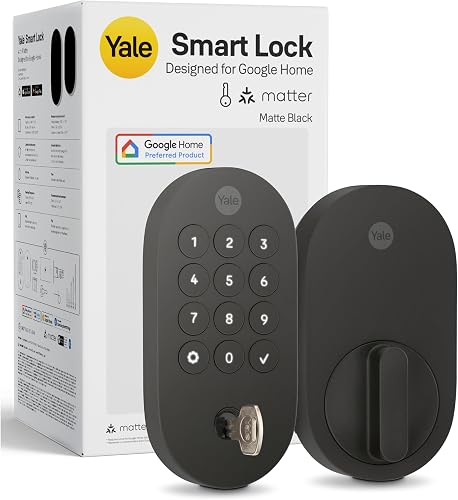
- Matter over Thread
- Designed for Google Home
- Remote access requires a Matter hub
Yale's Matter deadbolt is designed for Google Home and includes a backlit keypad and backup key. Remote access requires a Matter hub.
Pros
- Backlit keypad
- Backup key included
- Grade 2 certified by BHMA
Cons
- Remote access needs a Matter hub
- Works in the US and Canada only
Yale's Matter deadbolt is designed for Google Home and includes a backlit keypad, voice control and a backup key. Its Matter over Thread connection can join other compatible smart home setups, but remote access requires a Matter hub.
Yale says the lock is Grade 2 certified by BHMA. Its stated fit is for doors 1 3/4–2 1/4 in thick with a 2 1/8 in bore hole, and it works in the US and Canada.
Choose it if you use Google Home and want keypad entry with a physical backup. Skip it if you need remote access without a hub, live outside the supported regions, or have a door outside its stated measurements.
9. Kwikset Aura Reach: Best for local code control
Kwikset Aura Reach: Best for local code control

- Matter over Thread and Bluetooth
- Manage codes through Bluetooth when nearby
- Geofence auto-open
Aura Reach combines a backlit touchpad with nearby Bluetooth app controls and Matter support. Its code management is useful if you prefer handling access locally.
Pros
- Supports up to 250 user codes
- Backlit touchpad with proximity wakeup
- Kwikset SmartKey rekeying
Cons
- Bluetooth is the stated direct app connection
- Matter over Thread needs a compatible hub
Kwikset Aura Reach pairs Matter with Bluetooth app control when you're nearby. Its backlit touchpad has a fingerprint-resistant coating and proximity wakeup, which lights the screen as you reach for it.
The Kwikset app manages access codes and settings over Bluetooth. Geofence auto-open is also available, and Kwikset says the lock supports up to 250 user codes.
Choose it if you want a keypad, nearby app control and code management. Skip it if you need direct remote app access over Wi-Fi; Bluetooth is the stated direct app connection, and Matter-over-Thread features need a compatible hub.
10. Philips Matter Fingerprint Deadbolt: Best for fingerprint entry
Philips Matter Fingerprint Deadbolt: Best for fingerprint entry

- Matter over Thread
- Fingerprint reader supports up to 50 prints
- Touchscreen keypad and adjustable auto-lock
This Philips deadbolt brings fingerprint and touchscreen entry together with app and voice control. Smart home access requires a Matter-compatible hub.
Pros
- Supports up to 50 fingerprints
- Auto-lock time adjusts from 0 to 180 seconds
- Physical key included
Cons
- Matter smart home use needs a compatible hub
- AA alkaline batteries required
The Philips Matter Fingerprint Deadbolt combines a touchscreen keypad with a fingerprint reader that supports up to 50 prints. You can also use app control, voice control or a physical key.
Matter-over-Thread smart home access requires a compatible Matter hub. Philips says the auto-lock delay can be set from 0 to 180 seconds, and the lock needs AA alkaline batteries.
Choose this model if you want fingerprint entry and a glass touchscreen in one deadbolt. Skip it if you don't have a compatible hub for smart home access or need to avoid alkaline batteries.
How do you choose the best Matter smart lock?
The best Matter smart lock for you depends on what must work every day: remote access, guest entry, your chosen smart home app or the lock's physical fit. Decide those priorities before comparing secondary features.
Start with the connection. Wi-Fi models can offer remote access directly, while a Matter-over-Thread lock generally needs a compatible Thread Border Router or Matter controller for smart home network access.
A lock may still accept a local code, fingerprint or key when remote features are unavailable.
Next, choose the entry method your household will actually use. Codes suit guests who don't need an app, fingerprints avoid remembering a code, and Apple Home Key lets supported Apple devices tap to enter.
Keep a physical key or another local option in mind if you don't want entry to depend on a phone.
Finally, distinguish a full replacement deadbolt from a retrofit device or lever lock. Level Bolt keeps the existing exterior hardware, while Aqara U300 is made for a lever-style door.
A full deadbolt replaces the existing deadbolt hardware and may change the look of the door.
What hub does a Matter smart lock need?
A Matter-over-Thread lock needs a compatible Thread network and controller for connected smart home features. The exact controller depends on the ecosystem and feature you want to use, so verify compatibility before buying.
Some picks have additional connection options. The Ultraloq Bolt SE and Kwikset Halo Select have built-in Wi-Fi, but their Matter features still have their own requirements.
The Halo Select offers remote Wi-Fi control without a hub. Aqara U100 and U50 features such as remote passwords or Matter support rely on Aqara hubs.
Don't assume that owning any smart speaker or hub is enough. Check that it supports the required Thread and Matter functions, then confirm that the lock's app supports the access feature you're buying it for.
What door measurements should you check?
Measure the door and existing lock preparation before ordering. For a deadbolt, check door thickness, bore hole and backset; for a retrofit model, also confirm that the existing deadbolt is compatible.
The U300 has its own lever-lock fit requirements, so its measurements differ from a deadbolt's. Use our door measurement guide for keyless locks to check the basics, and see the keyless door lock guide if you are still deciding which lock format belongs on your door.
Which entry methods are useful for your household?
A keypad is practical for families, visitors or service providers who need separate access codes. A fingerprint reader can make daily entry faster for people who prefer not to type, while a physical key provides a non-digital backup.
Apple Home Key is useful if you want tap access with a supported iPhone or Apple Watch, but it is not the same as general Matter compatibility. UWB goes further by supporting hands-free approach opening on specific Apple devices, but it requires compatible equipment and may be unnecessary if a keypad or fingerprint is enough.
Think about who needs access and how often. A one-time code can suit a short visit, while scheduled or permanent codes can suit recurring access; choose a lock that offers the specific sharing method you need.
How should you set up a Matter smart lock?
Plan the hub, app and door fit before removing the existing lock. This avoids getting halfway through installation only to find that the door or network setup does not support the feature you expect.
For a full replacement, follow the lock's installation guide and make sure the bolt moves smoothly before adding connected features. For a retrofit model, keep the existing hardware aligned and confirm that the bolt can extend and retract without binding.
After installation, pair the lock with the app or hub required for your chosen connection. Add users and codes, set any auto-lock behavior, and try each access method at the door while it is open.
Testing movement before closing the door helps catch alignment problems without locking anyone out.
Keep a backup entry method ready during setup. If the lock includes a physical key, keep it accessible; if it uses emergency charging, know where its USB-C port is and what kind of cable or power source you can use.
What care and daily-use habits help?
Keep the lock's batteries fresh and pay attention to low-battery alerts. Battery life varies by model and use, so treat advertised estimates as planning guidance and keep the correct replacement battery type available.
Keep the bolt and strike area clear of dirt and obstructions. If the deadbolt becomes difficult to turn, check door alignment and the strike plate before assuming the app or network is at fault; a smart lock still depends on the door and bolt moving freely.
Review codes and shared access from time to time. Remove temporary access that is no longer needed, and make sure household members know how to use the backup method.
Auto-lock can help prevent an unprotected door, but set its delay to match how people enter and exit.
What common Matter smart lock mistakes should you avoid?
The most common mistake is buying for the word “Matter” without checking the actual connection. Matter over Thread and Wi-Fi have different hub needs, and a lock may support one app feature only when paired with a particular hub.
Another mistake is confusing Apple Home Key with Matter. Home Key is a tap-to-enter feature supported by selected locks and Apple devices; Matter support alone does not add it.
Door fit is another frequent source of trouble. A deadbolt, lever and retrofit bolt are different formats, and measurements for one do not guarantee compatibility with another.
Measure the door and verify the exact lock format before ordering.
Finally, don't rely on only one way to enter. A phone can be unavailable, a battery can run low, or a connection can drop.
Pick a lock with a backup method that fits your household, then make sure everyone knows how to use it.
Which Matter smart lock should you choose?
Choose the Ultraloq Bolt SE if you want several entry options and built-in Wi-Fi alongside Matter over Thread. Pick the Kwikset Halo Select for remote Wi-Fi access without a hub, the Aqara U100 for Apple Home Key and fingerprints, or Level Bolt if keeping existing keys and exterior hardware matters most.
For Apple Home Key, compare the Aqara U100 and U400 against your hub and device requirements. Before ordering, confirm the door fit and the hub needed for the features you plan to use, then review smart lock vs keypad lock if you're still deciding how you want people to enter.
Our top 3 picks at a glance
-
1
-
2
-
3
Frequently asked questions
Do Matter smart locks need a hub?
Some do, and some don't. Matter over Thread locks need a compatible Thread Border Router or Matter controller for smart home network access, while the Kwikset Halo Select offers Wi-Fi remote control without a hub.
Check which features need a hub, since local keypad or fingerprint entry may still work without one.
What is the difference between Matter and Thread?
Matter is the smart home standard that lets compatible devices connect across supported platforms. Thread is a low-power wireless network used by some Matter devices.
A Matter over Thread lock needs a compatible Thread Border Router or hub to join that network.
Read our guide to what Matter means for smart locks for more detail.
Can a Matter smart lock work with Apple Home?
Yes, if the specific lock supports Apple Home and you have the required hub or controller. Apple Home Key is a separate feature that lets you tap a supported iPhone or Apple Watch at the lock.
For Home Key options, see our Apple Home Key smart lock picks.
Can I use a Matter lock without internet?
Local entry methods such as a keypad, fingerprint reader or physical key can still provide access when internet service is down. Remote control and alerts depend on the lock's connection and smart home setup.
Some Aqara U50 one-time local passwords can work without internet.
How do I choose between a retrofit lock and a full deadbolt?
Choose a retrofit lock if you want to keep your existing exterior hardware and keys, and your deadbolt is compatible. Choose a full deadbolt if you want the lock's keypad, fingerprint reader or other hardware installed on the door.
Measure your door and compare its lock preparation before buying.