7 Best Z-Wave Smart Locks (October 2026)
The best Z-Wave smart locks include the Kwikset HomeConnect 620 for high code capacity, the Schlage Connect for a Grade 1 deadbolt, and the Yale Assure Lock 2 Z-Wave for door-closed auto-lock.
On this page (11 sections)
- How we chose these Z-Wave smart locks
- Compare the best Z-Wave smart locks
- 1. Kwikset HomeConnect 620: Best for high code capacity
- 2. Schlage Connect: Best for a Grade 1 deadbolt
- 3. Yale Assure Lock 2 Z-Wave: Best for door-closed auto-lock
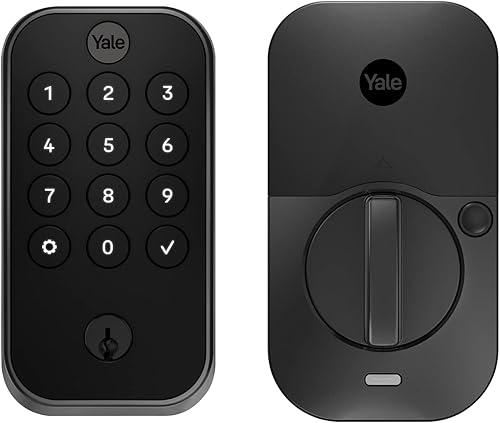
- 4. Yale Assure Touchscreen Z-Wave: Best for code-only entry
- 5. Kwikset HomeConnect 918: Best for contemporary styling
- 6. Ultraloq Bolt Z-Wave: Best for a long-range Z-Wave setup
- 7. Yale Z-Wave Fingerprint Deadbolt: Best for fingerprint entry
- What should you check before choosing a Z-Wave lock?
- Which Z-Wave smart lock should you choose?
The best Z-Wave smart lock for most homes is the Kwikset HomeConnect 620. It pairs long-range Z-Wave with up to 250 user codes and scheduled auto-lock, while the Schlage Connect is a strong choice if a Grade 1 rating matters more to you.
A Z-Wave lock works through a compatible hub, so choose the hub and lock as a pair. For a quick explanation of the network and its role, start with what a Z-Wave smart lock is.
Our picks at a glance
-
1

-
2

-
3
- 4
 Check it
Yale Assure Touchscreen Z-Wave
Best for code-only entry - 5
 Best for contemporary stylingCheck it
 - 6
 Best for a long-range Z-Wave setupCheck it
 - 7
 Check it
Yale Z-Wave Fingerprint Deadbolt
Best for fingerprint entry
How we chose these Z-Wave smart locks
We compared the stated connection options, access methods, hub requirements and security features against what Z-Wave shoppers typically need. Our score weighs specs, features and buyer feedback against what you're shopping for.
A higher score reflects a closer fit for common needs such as broad code management, useful auto-lock options and a clear path to hub integration. It doesn't mean every lock suits every door or smart home.
Compatibility deserves special attention. Some locks require a separately sold hub, and the smart features offered can depend on the controller, app and region.
Compare the best Z-Wave smart locks
These seven picks cover keypad, fingerprint and app access, with several options for long-range connections. Compare hub needs and the way you want to open first, then look at code limits and auto-lock behavior.
| Product | Best for | Connection | Access | Locking | Our score |
|---|---|---|---|---|---|
| Kwikset HomeConnect 620 | high code capacity | Z-Wave 700 Long Range | Touchscreen and up to 250 user codes | Scheduled auto-lock | 8.0 |
| Schlage Connect | a Grade 1 deadbolt | Z-Wave Plus | Touchscreen and up to 30 codes | 7.9 | |
| Yale Assure Lock 2 Z-Wave | door-closed auto-lock | Bluetooth and Z-Wave | Keypad, Auto-Unlock and app | DoorSense auto-lock | 7.5 |
| Yale Assure Touchscreen Z-Wave | code-only entry | Z-Wave | Touchscreen codes and physical keys | 7.4 | |
| Kwikset HomeConnect 918 | contemporary styling | Z-Wave 700 Long Range | Touchscreen and up to 250 user codes | Scheduled auto-lock | 7.3 |
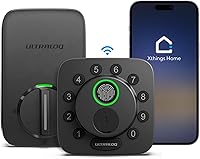
| Ultraloq Bolt Z-Wave | a long-range Z-Wave setup | Z-Wave and Z-Wave Long Range | App, keypad and key | 7.2 | |
| Yale Z-Wave Fingerprint Deadbolt | fingerprint entry | Bluetooth and Z-Wave | Fingerprint, keypad, app and backup key | DoorSense auto-lock | 7.0 |
1. Kwikset HomeConnect 620: Best for high code capacity
Kwikset HomeConnect 620: Best for high code capacity
- Z-Wave 700 Long Range
- Up to 250 user codes
- Scheduled auto-lock
- BHMA Grade 2
Long-range Z-Wave and room for many user codes make the 620 a flexible pick for busy households. It requires a compatible hub, sold separately.
Pros
- Up to 250 user codes
- Long-range connection to a compatible hub
- Auto-lock has several time settings
Cons
- Requires a compatible Z-Wave hub
- Touchscreen entry only
The Kwikset HomeConnect 620 is the top choice for households that need to manage access for family, guests or service providers. It supports up to 250 user codes, and one programming code lets you edit or delete them.
Its Z-Wave 700 Long Range connection is designed to connect directly to a compatible hub. The 620 also supports SmartStart pairing and S2 encryption, and Kwikset names Ring Alarm compatibility with a Ring Alarm smart hub.
Auto-lock can be set for 30 seconds, 1 minute, 3 minutes, 5 minutes or 10 minutes. The lock uses 4 AA batteries, and Kwikset states a battery life of at least 12 months.
Choose the 620 if code capacity and scheduled locking are your priorities. You can also compare it with other Kwikset smart locks when brand and model differences matter.
2. Schlage Connect: Best for a Grade 1 deadbolt
Schlage Connect: Best for a Grade 1 deadbolt
- Z-Wave Plus
- Up to 30 access codes
- Built-in alarm
- ANSI/BHMA Grade 1
Schlage combines Z-Wave Plus with a Grade 1/AAA rating and built-in alarm. A compatible hub or security system is needed for remote control.
Pros
- Grade 1/AAA rating
- Built-in alarm
- Backup physical key
Cons
- Supports up to 30 codes
- Hub or system sold separately
Schlage Connect stands out for its ANSI/BHMA Grade 1/AAA rating and built-in alarm. Its Z-Wave Plus connection works with a compatible smart home or security system, including systems such as SmartThings or Ring Alarm.
The touchscreen supports up to 30 unique access codes and has a backlight for low-light entry. The lock also includes a physical backup key and operates on 4 AA batteries.
Schlage states up to 1 year of battery life with typical use. Its Grade 1 rating makes it the clearest fit here if you value the stated deadbolt grade, though it offers fewer codes than the Kwikset picks.
3. Yale Assure Lock 2 Z-Wave: Best for door-closed auto-lock
Yale Assure Lock 2 Z-Wave: Best for door-closed auto-lock
- Z-Wave module included
- DoorSense auto-lock
- Unlimited access codes
- Keypad, Auto-Open and app access
DoorSense can trigger auto-lock after it detects that the door has closed. Remote features need a compatible Z-Wave hub and app.
Pros
- DoorSense detects a closed door
- Unlimited access codes
- Z-Wave module included
Cons
- Compatible hub required for Z-Wave remote access
- Specified for use in the US and Canada
The Yale Assure Lock 2 is a good match if you want auto-lock to respond to the door's position. Its included DoorSense can detect when the door has closed, then the lock can secure it.
You can use the keypad, optional Auto-Open, Yale Access app or Apple Watch for entry. The lock supports unlimited access codes through the app, which can help when you want to share and track access for different people.
For remote control, add the lock to a compatible Z-Wave system and app. The product is specified for use in the US and Canada, so check regional compatibility if you live elsewhere.
4. Yale Assure Touchscreen Z-Wave: Best for code-only entry
Yale Assure Touchscreen Z-Wave: Best for code-only entry
- Touchscreen keypad
- Z-Wave module included
- Auto-lock
- BHMA Grade 2
This Yale suits a keypad-first setup, with auto-lock and a Z-Wave module. Its smart features depend on a compatible controller.
Pros
- Two physical keys included
- Auto-lock can be disabled
- BHMA Grade 2 deadbolt
Cons
- Hub required for smart features
- Smartphone use requires a separate Yale Access Upgrade Kit
This Yale focuses on touchscreen code entry and includes two physical keys for backup. It also has auto-lock, which you can disable through the lock menu.
The included Z-Wave module lets you pair it with a compatible system, but the hub is sold separately. The listed smart home features can vary with the Z-Wave controller, so confirm the functions you rely on before settling on this model.
Smartphone use requires Yale's separate Access Upgrade Kit. Choose this lock if keypad access is enough for daily use and app access is an optional add-on.
5. Kwikset HomeConnect 918: Best for contemporary styling
Kwikset HomeConnect 918: Best for contemporary styling
- Z-Wave 700 Long Range
- Up to 250 user codes
- Scheduled auto-lock
- BHMA Grade 2
The 918 has the same stated code capacity and long-range Z-Wave features as the 620, in a contemporary matte-black design. A compatible hub is required.
Pros
- Up to 250 user codes
- Long-range connection to a compatible hub
- Several auto-lock time settings
Cons
- Requires a compatible Z-Wave hub
- No separate fingerprint access
The HomeConnect 918 shares several useful details with the 620, including Z-Wave 700 Long Range, S2 encryption, SmartStart and capacity for up to 250 user codes. Its contemporary matte-black finish gives it a different look for a front door.
It supports scheduled auto-lock at 30 seconds, 1 minute, 3 minutes, 5 minutes or 10 minutes. Kwikset also names Ring Alarm and SmartThings compatibility, with a compatible hub required.
Pick the 918 when you want the 620's broad code capacity and long-range connection in this style. Both locks need a compatible hub, so verify your system before deciding.
6. Ultraloq Bolt Z-Wave: Best for a long-range Z-Wave setup
Ultraloq Bolt Z-Wave: Best for a long-range Z-Wave setup
- 800 Series Z-Wave Long Range
- Keypad, app and key access
- Auto-lock and Auto-Open
- BHMA Grade 1 and IP65
This lock pairs long-range Z-Wave with keypad, app and key entry. It needs a compatible Z-Wave hub for its remote controls and automations.
Pros
- 800 Series Z-Wave Long Range
- BHMA Grade 1 and IP65
- Works with Alarm.com, Home Assistant and SmartThings
Cons
- Compatible hub required
- Battery-life claims are not a specific runtime
The Ultraloq Bolt uses 800 Series Z-Wave Long Range and supports app, keypad and key access. A compatible hub enables remote locking and opening, code management, alerts and automations.
Its stated integrations include Alarm.com, Home Assistant and SmartThings. It also lists BHMA Grade 1 certification and IP65 weather resistance, details that may help narrow choices for an exposed entry or a home using those systems.
Ultraloq describes its battery performance as longer than typical smart locks, but does not give a specific runtime. Consider this pick for its stated integrations and connection mode, and check the hub pairing you plan to use.
7. Yale Z-Wave Fingerprint Deadbolt: Best for fingerprint entry
Yale Z-Wave Fingerprint Deadbolt: Best for fingerprint entry
- Fingerprint access
- DoorSense auto-lock
- Unlimited codes
- BHMA Grade 2
Fingerprint entry gives this Yale a distinct place in a Z-Wave setup, alongside keypad and app access. A compatible hub is required for Z-Wave features.
Pros
- Fingerprint, keypad and backup key access
- DoorSense detects a closed door
- Unlimited access codes
Cons
- Compatible hub required
- Specified for use in the US and Canada
The Yale Z-Wave Fingerprint Deadbolt adds fingerprint access to keypad, app and backup-key entry. It also supports DoorSense, Auto-Lock and unlimited access codes.
A compatible hub and app are required for its Z-Wave smart home features. Yale names SmartThings, Hubitat and other Z-Wave systems, and specifies use in the US and Canada.
The product description says the fingerprint sensor stores up to 20 prints and opens in under 0.5 seconds, but those details aren't in the product bullets or specs. Choose it if fingerprint entry is the feature you want most, and confirm compatibility with your hub before buying.
What should you check before choosing a Z-Wave lock?
Check your hub, door fit and preferred entry method before comparing extra features. Those three decisions can rule out a lock even when its feature list looks appealing.
Does your hub support the lock?
A Z-Wave lock needs a compatible hub or security system for remote access and smart home control. The hub guide for smart locks explains what the hub does and what to check before you connect a lock.
The Kwikset HomeConnect 620 and 918 specify long-range Z-Wave and require a compatible hub. The Yale models also rely on a compatible system for their Z-Wave features, while Ultraloq names Alarm.com, Home Assistant and SmartThings.
Do you want a keypad, fingerprint or app entry?
A touchscreen keypad works when you want to enter a code without a phone. The Schlage Connect and both Kwikset HomeConnect models provide keypad access, while the Yale fingerprint model adds a way to enter without remembering a code.
App and remote features depend on the lock's hub setup. If you mainly need local code entry, read our guide to keyless door lock types and features to compare simpler options too.
Will the lock fit your door?
Door thickness and backset can differ by lock. The Kwikset models specify doors 1 3/8 in to 2 in thick and an adjustable backset from 2 3/8 in to 2 3/4 in, while the Yale touchscreen model lists a different door-thickness range.
Measure your door before buying, and check the model's fit requirements. Our door measurement guide walks through the measurements to take.
Does auto-lock match how you use the door?
Auto-lock can reduce the chance that you leave the door unprotected, but settings work differently across models. Kwikset offers several timed intervals, while the Yale Assure Lock 2 models use DoorSense to detect a closed door.
Think about whether you want a timer or a door-position trigger. Either way, set the feature to suit your household and avoid an unexpected lockout.
Which Z-Wave smart lock should you choose?
Choose the Kwikset HomeConnect 620 if you want long-range Z-Wave, many user codes and several auto-lock intervals. Choose Schlage Connect if its Grade 1 rating and built-in alarm fit your priorities, or the Yale Assure Lock 2 if DoorSense is the feature you want.
For fingerprint entry, look at the Yale Z-Wave Fingerprint Deadbolt. Before you buy, confirm your hub supports the lock and measure your door; then use our guide to Z-Wave and Wi-Fi smart locks if you're still deciding on a network.
Our top 3 picks at a glance
-
1
-
2
-
3
Frequently asked questions
Do Z-Wave smart locks need a hub?
Yes, remote control and smart home features generally require a compatible Z-Wave hub or security system. The hub connects the lock to your app and other devices.
Check that your chosen lock works with your specific hub before buying.
Hub compatibility can vary by model and feature.
Can a Z-Wave lock work without internet?
A Z-Wave lock can still use local keypad or key access without an internet connection. Remote app control usually depends on the hub's internet connection, while local automations may continue if the hub supports them.
Check your hub's behavior during an internet outage.
What is the difference between Z-Wave and Z-Wave Long Range?
Z-Wave Long Range is designed to connect compatible devices directly to a compatible hub over greater distances. Standard Z-Wave uses a mesh, where devices can pass signals along to extend coverage.
The lock and hub must support the same connection mode for those benefits.
Are Z-Wave smart locks secure?
A Z-Wave smart lock can add remote control and access codes, but its security also depends on the lock, hub, account and door hardware. Some picks here specify S2 encryption, while others list ratings such as BHMA Grade 1 or Grade 2.
Use unique account credentials and keep the hub software current.
Can I use a Z-Wave lock with Ring Alarm?
Some models here list Ring Alarm compatibility, including the Kwikset HomeConnect 620, HomeConnect 918 and Schlage Connect. The system needs a compatible Ring Alarm hub, and available controls can vary by lock and setup.
Check the exact model compatibility before choosing a lock.