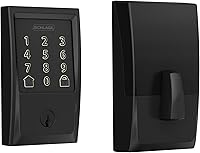
How to Install a Schlage Smart Lock
Here's how to install a Schlage smart lock: swap the deadbolt on an existing door using just a screwdriver, then connect it to the Schlage Home app and set your first codes. Most homes can do the full job in about 30 to 60 minutes without hardwiring.
On this page (9 sections)
- What tools and parts do you need before you start?
- How do you remove the old deadbolt?
- How do you check the door fits a Schlage smart lock?
- How do you install the new deadbolt in the door?
- How do you connect a Schlage smart lock to the app?
- How do you set codes and use the keypad after install?
- How do you test and troubleshoot the finished install?
- What should you do after the first week?
- The bottom line on installing a Schlage smart lock
Here's how to install a Schlage smart lock: swap the deadbolt on an existing door with just a screwdriver, then connect the lock to the Schlage Home app and set your first codes. The full job usually takes 30 to 60 minutes, and nothing needs to be hardwired to the door.
Most Schlage smart locks are designed to replace a standard deadbolt, so you're reusing the holes already in your door. The work is mostly careful unscrewing, checking the fit and getting the app connection right on the first try.
What tools and parts do you need before you start?
A Phillips screwdriver is the only tool Schlage asks for, along with a tape measure, a pencil and the lock's installation hardware. Add a drill only if your door needs new holes, which most swaps don't.
Schlage includes the installation hardware and instructions in the box. The Encode and Encode Plus also come with batteries and a physical backup key.
Have the deadbolt, keys, batteries and your phone's app store ready before you take the old lock off the door.
Clear space on both sides of the door and put a towel or small bowl under the work area for loose screws. If someone else lives with you, tell them the door won't lock during the job so nobody gets locked out.
How do you remove the old deadbolt?
Unscrew the interior thumbturn and the exterior cylinder, then pull the bolt out of the door edge. Keep the parts in one place so you can compare them with the new lock.
- Open the door and hold it steady, or prop it so it won't swing.
- Remove the two screws on the interior side of the deadbolt.
- Pull the interior plate and thumbturn away from the door.
- Take out the exterior half and set it aside.
- Remove the two screws holding the bolt in the door edge, then slide the bolt out.
Check the door edge for a loose strike plate on the frame. A strike plate that has shifted is a common reason a new lock feels tight later.
Our fit and basics section covers the door measurements that matter.
How do you check the door fits a Schlage smart lock?
Schlage's smart deadbolts fit standard doors 1-3/8 in to 1-3/4 in thick with a 2-3/8 in or 2-3/4 in backset. Measure the backset from the door edge to the center of the hole before buying.
The cross bore should be 1-1/8 in and the edge bore 1 in for a typical deadbolt. Most US homes already meet these numbers, so the lock drops into the existing holes.
If your door is thinner, thicker or bored differently, you may need an adapter kit or a different model.
Door material matters too. Wood is easiest to adjust.
Steel and fiberglass doors need care so the bolt and screws still line up cleanly. A deadbolt that binds is more often a hole or strike-plate problem than a lock problem.
How do you install the new deadbolt in the door?
Slide the bolt into the edge hole first, then mount the exterior and interior halves and drive the screws in evenly. The Encode's Snap 'n Stay design holds the lock on the door so both hands stay free while you work.
Step by step for the deadbolt body
Set the bolt in the edge of the door and line up its screw holes. Drive the two edge screws snug but not over-tight.
A bolt that sits proud of the door edge will rub on the frame, so check it sits flush.
Then feed the exterior keypad or touchscreen half through the outside hole. Hold it in place and fit the interior mounting plate and thumbturn from the inside.
Start the two long screws by hand so you don't cross the threads.
Tighten them in turns, alternating sides, until both halves pull flat against the door. Don't overtighten, since that can stop the thumbturn moving freely.
Test the bolt with the door open before you close it.
How do you align the strike plate?
Close the door slowly and watch where the bolt meets the frame. If it drags, loosen the strike plate screws and shift the plate slightly, or file the opening a little if the fit is close.
Then retighten and test the lock by hand.
How do you connect a Schlage smart lock to the app?
Download the Schlage Home app, create an account and follow the in-app add-lock steps with the lock within Bluetooth range. Keep the door open while you pair so you can test the bolt as you go.
Put the batteries in first. The app walks you through finding the lock, naming it and connecting it to your WiFi network.
For the WiFi models you'll need your network name and password handy. The lock joins the 2.4 GHz network in most homes.
Once paired, set your first entry code and test it from the outside keypad. Add family members or a cleaner as separate codes so each person has their own.
The app also shows lock history and sends notifications, so check the settings before you rely on them.
How do you set codes and use the keypad after install?
Program your first code in the app or with the keypad instructions, then add a second code for a backup. Test each code with the door open so a mistake doesn't leave you locked out.
The Encode and Encode Plus manage up to 100 access codes through the Schlage Home app. The BE365 keypad deadbolt uses 2 pre-programmed codes out of the box and allows up to 19 codes total.
Keep a physical backup key outside the house or with a trusted neighbor, because all three models include one.
Check the keypad lighting before you finish. Silicone-coated buttons that light up help at night.
Set auto-lock if you want the door to relock on its own, and pick a delay that suits your household.
How do you test and troubleshoot the finished install?
Open and close the door several times and lock and open it from the keypad, the app and the thumbturn. The bolt should slide without force and the door should shut without needing a push.
If the app won't connect, check that the lock is close enough to the router and that the WiFi password is right. If the keypad doesn't respond, check the batteries and the battery indicator.
A bolt that jams usually points to strike-plate alignment, not the electronics.
For doors that face the weather, read are smart locks weatherproof before the install. And if you want to know when a hub is still useful, our guide on do smart locks need a hub explains the cases.
Which Schlage lock should you install first?
If you want the simplest WiFi setup and the strongest all-round spec, the Schlage Encode is the best pick for most front doors. Its built-in WiFi means no hub, and its BHMA ratings and built-in alarm cover security and durability.
The Encode Plus adds Apple HomeKit and tap-to-open with an iPhone or Apple Watch. That's the best fit if your household runs on Apple Home.
The Schlage BE365 keypad deadbolt is the budget-friendly choice for a back door or garage entry, since it's a standalone keypad with no app or WiFi at all. Compare more options in our guide to the cheap smart lock picks.
What should you do after the first week?
Check the battery level and review the lock history in the app, then tighten any screws that worked loose and confirm the bolt still lines up. Retest each code you've handed out.
Look at the app's notification settings once more, since alerts for forced entry or door movement only help if they're switched on. Recheck the door seal and strike plate as the seasons change, because wood can swell and shift.
If you later swap to another brand, the steps are similar. Our walkthrough on how to install a yale smart lock covers that model's differences.
The bottom line on installing a Schlage smart lock
Pick the model that matches your smart home, then install it with one screwdriver and finish in the app. The Schlage Encode is the best overall for most homes, the Encode Plus is best for Apple users, and the BE365 is the budget pick for a simple keypad door.
For anyone searching how to install a Schlage smart lock, the key is preparation: measure the door, remove the old deadbolt cleanly, and test the bolt before you close the door. Then connect the app and set codes you'll actually remember.
Frequently asked questions
How long does a Schlage smart lock install take?
Plan on 30 to 60 minutes for a straightforward swap on an existing door, plus a little more for app setup and codes. A brand new door hole or a poorly aligned strike plate can stretch the job, so keep the time flexible.
Do Schlage smart locks need any hardwiring?
No. Schlage's smart deadbolts run on batteries, so there's no wiring to run to the door.
The Encode models use four AA batteries, while the BE365 keypad deadbolt runs on a 9-volt battery.
Can I install a Schlage smart lock on a metal door?
Yes, as long as the door has the standard 2-3/8 in or 2-3/4 in backset and a 1-1/8 in cross bore. Metal doors can be harder to drill or adjust, so test the fit before you remove the old deadbolt.
Do I need a hub to install a Schlage smart lock?
No hub is needed for the WiFi models. The Schlage Encode and Encode Plus connect straight to your home WiFi, and the BE365 is a standalone keypad lock.
Our guide to hubs covers when one still helps.