What Is Apple Home Key and Which Locks Offer It?
Apple Home Key is a digital key in Apple Wallet that lets you tap a compatible iPhone or Apple Watch on a supported lock to enter. The lock and Apple Home setup determine which features, such as sharing access, are available.
On this page (7 sections)
Apple Home Key is a digital key in Apple Wallet that lets you tap a compatible iPhone or Apple Watch on a supported lock to enter. The lock and Apple Home setup determine which features, such as sharing access, are available.
Unlike an access code, a Home Key works through a nearby tap. You can still choose a lock with other entry methods, such as a keypad or mechanical key, as backup options.
What is Apple Home Key on a smart lock?
Apple Home Key is a tap-to-enter credential stored in Apple Wallet. When the lock supports it, you bring your compatible iPhone or Apple Watch near the lock's reader to open the door.
Home Key is part of Apple Home support, but it doesn't describe every feature a smart lock may have. Remote access, guest sharing, automations, and hub requirements depend on the lock and your home setup.
Apple says Home Key can be added to Wallet through the Home app when you set up a compatible lock. See Apple's Home Key setup instructions for current device and setup details.
Is Apple Home Key the same as NFC?
Home Key uses a close-range tap, but NFC support alone doesn't mean a lock supports Apple Home Key. Look for the exact Home Key feature in the lock's compatibility details.
Some locks also accept separate NFC cards or Android NFC phones. Those are distinct access methods and don't prove that Apple Wallet Home Key is supported.
How does Apple Home Key work when you tap?
The lock reads the digital credential when your iPhone or Apple Watch is brought close to its reader. Follow the lock's setup instructions to add it to Apple Home and place its key in Wallet.
Depending on the device and settings, Home Key may work in Express Mode without first opening the phone. Apple's Home Key support page explains Express Mode and power reserve; confirm your device supports the feature before relying on it.
A smart lock can also offer a keypad, fingerprint reader, app access, or a physical key. For a broader overview of access methods, see how keyless door locks work.
Which locks offer Apple Home Key?
The locks below explicitly support Apple Home Key, with different entry methods and setup needs.
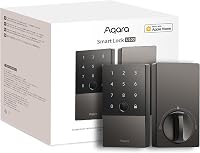
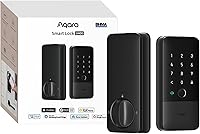
The Aqara U100 pairs Home Key with a fingerprint reader, keypad, app-configured passwords, one-time local passwords, and a mechanical key. Aqara says sharing Apple Home Keys requires an Apple Home hub.
The Aqara U400 adds fingerprint and touchscreen passcode entry, app remote access, NFC card support, and a physical key. Aqara says Home Key requires a Thread-enabled Matter controller; its hands-free UWB feature has separate device and software requirements.
The Schlage Encode Plus supports Apple Home Key and built-in Wi-Fi. Schlage lists app controls, access-code management, lock history, and notifications among its features.
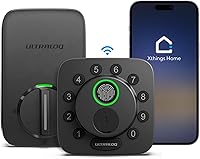
The Ultraloq Bolt NFC supports Apple Home Key and Android NFC, along with passcodes, app control, a door sensor, and two mechanical keys. Its remote access uses 2.4 GHz Wi-Fi and does not require a bridge.
For more options, see our guide to the best Apple Home Key locks.
Do you need an Apple home hub?
A hub is not a universal requirement for every Home Key feature. Requirements vary by lock and by whether you want sharing, remote access, or smart home automations.
For example, Aqara requires an Apple Home hub to share U100 Home Keys. Aqara says the U400 needs a Thread-enabled Matter controller for Apple Home Key, naming HomePod (2nd generation), HomePod mini, and Apple TV 4K (2021 or 2022).
Before choosing a lock, check which Apple device and hub you already own. Our guide to whether smart locks need a hub explains how hubs affect other smart lock features.
Does Apple Home Key work if your phone battery dies?
Some compatible Apple devices support Home Key with power reserve for a limited time after the device needs charging. That behavior depends on the device and its settings, so don't assume every phone or watch will work when its battery is depleted.
Keep a backup entry method available. A keypad code or physical key can help if you can't use your phone or watch.
What should you check before choosing a Home Key lock?
Check the exact Home Key requirements, other entry methods, and smart home connections before buying. A lock can support tap access while requiring extra equipment for sharing or other features.
- Confirm Apple compatibility: Check the lock maker's Apple Home Key requirements and Apple's current device guidance.
- Check hub needs: Find out whether a home hub or Thread-enabled Matter controller is needed for the features you want.
- Choose backup entry: Consider a keypad, fingerprint reader, or physical key if you want another way inside.
- Review the smart home platform: Home Key and Matter are related to Apple Home compatibility, but they are separate capabilities. Learn what Matter means for smart locks.
If you are comparing ecosystems, our guide to the best Matter smart locks covers models that use Matter.
Is Apple Home Key a good fit for your door?
Choose a Home Key lock if you want to use an iPhone or Apple Watch tap as one way to enter. Pick a model based on the extra access options and the Apple Home equipment you already have.
The U100 and U400 pair Home Key with fingerprint and keypad access. Schlage Encode Plus adds built-in Wi-Fi, while Ultraloq Bolt NFC supports Android NFC as well as Apple Home Key.
Check hub and device requirements before deciding, especially if guest sharing or hands-free entry matters to you. Then compare Apple Home Key lock options with your preferred backup method.
Frequently asked questions
What is Apple Home Key?
Apple Home Key is a digital home key stored in Apple Wallet. With a compatible lock and Apple device, you can tap your iPhone or Apple Watch on the lock to gain entry.
Some locks also support guest access sharing through Apple Home, which can require a home hub.
Does Apple Home Key work if my iPhone battery dies?
Some supported Apple devices can use Express Mode with power reserve, which may let Home Key work for a limited time after the device needs charging. Check Apple's current device requirements and the lock maker's instructions before relying on this as your only way in.
Do you need an Apple home hub for Apple Home Key?
You may not need a hub for basic tap access, but lock features differ. For example, Aqara says sharing U100 Apple Home Keys requires an Apple Home hub, while U400 Home Key support requires a Thread-enabled Matter controller such as a compatible HomePod or Apple TV.
Is Apple Home Key the same as NFC?
Home Key uses near-field communication for tap access, but a lock that supports NFC does not automatically support Apple Home Key. Check for explicit Apple Home Key support and confirm the compatible phone, watch, hub, and software requirements for the lock you choose.