Philips Wi-Fi Smart Deadbolt Review: Worth It? (October 2026)
The Philips Wi-Fi Smart Deadbolt suits homes that want fingerprint entry, passcodes and built-in Wi-Fi in one lock. It supports remote app access without a hub, but it needs 2.4 GHz Wi-Fi and does not include a door sensor.
On this page (7 sections)
- Philips Wi-Fi Smart Deadbolt review: who is it for?
- What entry methods and app features does it offer?
- How well does its Wi-Fi and auto-lock setup fit your door?
- What should you check before installation?
- How does the Philips compare with similar Wi-Fi locks?
- How should you plan for batteries and daily use?
- Is the Philips Wi-Fi Smart Deadbolt worth choosing?
The Philips Wi-Fi Smart Deadbolt is a good fit if you want fingerprint entry, passcodes and remote app control in one front-door lock. It connects over 2.4 GHz Wi-Fi without a hub, but it has no door sensor and needs AA alkaline batteries that you supply.
Its strongest selling point is choice: you can use a fingerprint, app, passcode, physical key or compatible voice assistant. Consider the eufy C220 if you want Apple Watch entry or use a eufy doorbell, and the Wyze Lock Bolt v2 if USB-C emergency power matters to you.
Philips Wi-Fi Smart Deadbolt review: who is it for?
The Philips Wi-Fi Smart Deadbolt is for households that want several ways to enter and manage access remotely. Its combination of fingerprint access, custom codes and built-in Wi-Fi covers common needs without requiring a separate hub.
Philips Wi-Fi Smart Deadbolt: Best for flexible entry

- Fingerprint, passcode, app and key entry
- Built-in Wi-Fi
- Up to 100 custom passcodes
A feature-rich deadbolt for households that want several ways to enter, remote app control and scheduled or one-time codes. Its 2.4 GHz Wi-Fi requirement and lack of a door sensor are worth weighing before you buy.
Pros
- Fingerprint and physical key entry
- Built-in Wi-Fi for remote access without a hub
- Up to 100 custom passcodes plus one-time or scheduled codes
- Auto-lock delay can be set from 10 to 180 seconds
Cons
- Supports 2.4 GHz Wi-Fi only
- AA alkaline batteries are required and not included
- No door sensor
Use the fingerprint reader for quick entry, or share a code with a guest who should not need an app account. The lock supports up to 100 custom passcodes, plus one-time and scheduled codes for temporary access.
It also fits households with a reliable 2.4 GHz network near the entry. If your router is far from the door, verify the signal before relying on remote controls or alerts.
When this Philips smart lock makes sense
Choose it if different people in your home prefer different entry methods. A family member can use a fingerprint while a cleaner or guest uses a code, and you can check access history in the app.
It may be less suitable if you need to know whether the door itself is closed. The lock has auto-lock, but no door sensor to confirm the door position.
What entry methods and app features does it offer?
The Philips smart lock supports five entry options: app, passcode, fingerprint, physical key and voice control through Alexa or Google Assistant. This gives you alternatives if you do not want to use your phone for every entry.
The app can create custom codes and share one-time or scheduled access with visitors. Real-time alerts and an access history can help you track lock activity while away.
Voice control requires signing in to your own Alexa or Google account and keeping the network connection stable. Treat voice access as an optional path, with a passcode or key available as a backup.
The lock also has an Away Mode that disables open methods except the master code. That can reduce the number of active entry routes while you're away, but keep the master code secure and available to the people who need it.
How well does its Wi-Fi and auto-lock setup fit your door?
The lock connects directly to 2.4 GHz Wi-Fi, and Philips recommends keeping the router and lock within 65 ft for better remote control. There is no hub to install, but walls and router placement can affect the signal at an exterior door.
Auto-lock can be set to engage after 10 to 180 seconds. Since there is no door sensor, this timer does not verify that the door is shut before locking; make sure the deadbolt can move freely and the door closes correctly.
If you are comparing connectivity options, our guide to whether smart locks need a hub explains what built-in Wi-Fi changes. You can also compare the trade-offs in Wi-Fi versus Z-Wave smart locks.
What should you check before installation?
The Philips deadbolt is designed for doors 1-3/8 to 2 in thick, and Philips says installation uses a screwdriver. Measure your door and check the existing deadbolt setup before ordering.
The installation instructions call for routing the cable underneath the latch and placing the tailpiece into the latch slot. Follow the manual and installation video closely, since a misaligned cable or tailpiece can interfere with operation.
Our door measurement guide walks through the dimensions to check before buying. Also make sure the latch and deadbolt move smoothly by hand before attaching the electronic assembly.
How does the Philips compare with similar Wi-Fi locks?
The Philips Wi-Fi Smart Deadbolt stands out for fingerprint access plus flexible code sharing. The alternatives below offer different ecosystems or backup features, so the best choice depends on which details matter most at your door.
| Lock | Entry options | Notable fit |
|---|---|---|
| Philips Wi-Fi Smart Deadbolt | Fingerprint, passcode, app, key, voice | Up to 100 custom codes and Away Mode |
| eufy C220 | Fingerprint, app, keypad, key, Apple Watch, voice | eufy doorbell routines and IP53 rating |
| Wyze Lock Bolt v2 | Fingerprint, app, code, key | USB-C emergency power and Wyze app |
| Philips Wi-Fi Smart Lock | Passcode, app, key, voice | Physical keypad buttons, no fingerprint |
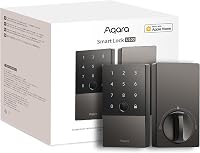
The Schlage Encode versus Arrive comparison may help if you're choosing between other Wi-Fi deadbolts. For a closer look at another fingerprint model, see our Aqara U100 review.
When should you choose the eufy C220?
Choose the eufy C220 if Apple Watch entry or eufy doorbell routines matter more than Philips's Away Mode. It also has an IP53 rating and a stated battery estimate of about 8 months with 8 AA batteries, though actual life can vary with use.
eufy C220: Best for eufy households
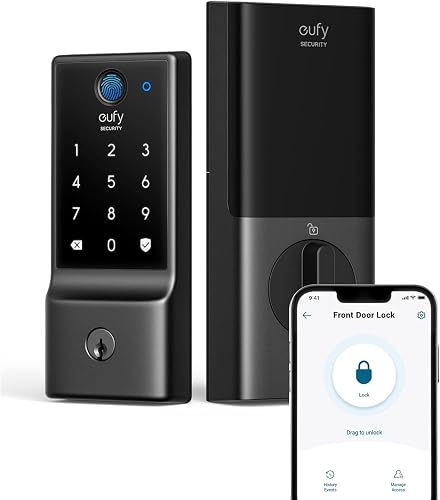
- Fingerprint, app, keypad, key, Apple Watch and voice entry
- Built-in Wi-Fi
- IP53 waterproof
A built-in Wi-Fi alternative with several entry methods and eufy ecosystem support. Consider it if you already use a eufy doorbell or want a stated battery estimate.
Pros
- Six ways to open
- Built-in Wi-Fi with no bridge required
- Works with eufy doorbell routines
- IP53 waterproof rating
Cons
- Battery life varies with use
- Fingerprint enrollment and app setup still require attention
When does the Wyze Lock Bolt v2 fit better?
The Wyze Lock Bolt v2 may suit a household already using Wyze devices or one that wants a USB-C emergency power option. Its entry methods include fingerprint, app, code and physical key.
Wyze Lock Bolt v2: Best for Wyze users

- Fingerprint, app, code and key entry
- Built-in Wi-Fi
- USB-C emergency power
A fingerprint deadbolt with app control, backup keys and USB-C emergency power. Its Wyze doorbell pairing may suit homes already using that system.
Pros
- Fingerprint scanner
- Built-in Wi-Fi and Wyze app control
- USB-C emergency power option
- Includes 8 AA batteries
Cons
- Battery life depends on use
- Wyze doorbell live-feed feature requires a compatible doorbell
Is the other Philips Wi-Fi Smart Lock a better match?
Consider the other Philips Wi-Fi Smart Lock if you prefer physical keypad buttons and do not need fingerprint access. It also offers app-managed permanent, one-time and timed passwords.
Philips Wi-Fi Smart Lock: Best for physical buttons
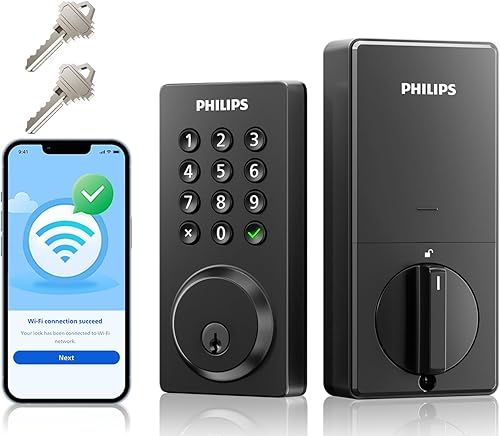
- Passcode, app, key and voice entry
- Built-in Wi-Fi
- Physical keypad buttons
Another Philips Wi-Fi deadbolt, with physical keypad buttons and app-managed access codes. Choose it if you prefer buttons and do not need fingerprint entry.
Pros
- Physical keypad buttons
- Built-in Wi-Fi and remote app control
- Up to 100 custom passwords
- Timed, one-time and permanent code options
Cons
- No fingerprint entry
- 8 AA batteries are not included
- No Apple Watch entry
How should you plan for batteries and daily use?
The Philips Wi-Fi Smart Deadbolt requires AA alkaline batteries, which are not included, and Philips gives no battery-life estimate for this model. Keep compatible batteries on hand and pay attention to app alerts rather than assuming a set replacement schedule.
If battery life is a deciding factor, compare the stated estimates on alternatives carefully. Our guide to smart lock battery life explains why use patterns and connectivity can affect how often you replace batteries.
Check that the door aligns with the frame and that the bolt extends fully before relying on auto-lock. A smart lock still depends on a door that closes and latches cleanly.
Is the Philips Wi-Fi Smart Deadbolt worth choosing?
The Philips Wi-Fi Smart Deadbolt is a strong match if you want fingerprint entry, remote access and flexible passcodes in a single deadbolt. Its 2.4 GHz Wi-Fi and no-hub setup are convenient when your router reaches the door.
Pick the eufy C220 if Apple Watch access or eufy routines are more useful, and the Wyze Lock Bolt v2 if USB-C backup power is a priority. Before buying the Philips, confirm door thickness, Wi-Fi signal and whether the lack of a door sensor works for your routine.
The best keypad deadbolts guide can help if you want to compare more options before deciding.
How we scored the Philips smart lock
Our score weighs specs, features and buyer feedback against what you're shopping for. The Philips earns 8.7 for combining fingerprint access, built-in Wi-Fi, remote app controls and several code types, with deductions for 2.4 GHz-only support, batteries not included and no door sensor.
Frequently asked questions
Does the Philips Wi-Fi Smart Deadbolt need a hub?
No, the Philips Wi-Fi Smart Deadbolt has built-in Wi-Fi for remote app access, so it does not need an extra hub. It supports 2.4 GHz Wi-Fi only, and Philips recommends keeping the router and lock within 65 ft for better remote control; check your signal at the door.
Can you open the Philips Wi-Fi Smart Deadbolt without a phone?
Yes, you can use a fingerprint, passcode or physical key without opening the app. The lock also supports voice control through Alexa or Google Assistant after you connect your own account and have a stable network.
Does the Philips Wi-Fi Smart Deadbolt detect whether the door is closed?
No, this model does not have a door sensor. Its auto-lock feature can lock after a delay you set from 10 to 180 seconds, but that does not confirm the door is fully closed; check the door position before relying on auto-lock.
What batteries does the Philips Wi-Fi Smart Deadbolt use?
Philips specifies AA alkaline batteries, also called LR6, and says batteries are not included. Keep compatible replacements available and check the app for alerts; this model has no published battery-life estimate.