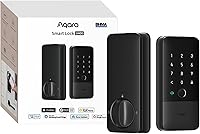
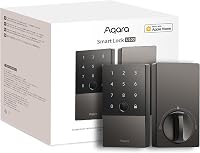
Aqara U100 Fingerprint Smart Lock Review: Worth It? (October 2026)
The Aqara U100 is a good fit if you want fingerprint entry, Apple Home Key and a keypad in one deadbolt. Choose it when those options matter more than built-in Wi-Fi or hands-free approach opening, and check the hub needs for the features you plan to use.
On this page (8 sections)
- What does the Aqara U100 offer?
- Which U100 entry methods fit your household?
- Which Aqara U100 smart home features require a hub?
- How should you set up and use the U100?
- What maintenance does the U100 need?
- How does the Aqara U100 compare with other smart locks?
- What should you check before buying the Aqara U100?
- Should you choose the Aqara U100?
The Aqara U100 combines fingerprint entry, Apple Home Key and a keypad in a smart deadbolt. It suits households that want several ways to get inside and are comfortable checking which connected features need a hub.
The key decision is whether its entry options match the way your household uses the door. If you mainly want fingerprint access, the U100 is the Aqara model to consider; if you want hands-free arrival or built-in Wi-Fi, compare the alternatives below.
What does the Aqara U100 offer?
The U100 gives you fingerprint, keypad, Apple Home Key and mechanical-key access. Its fingerprint reader can store up to 50 prints, which can suit a home where several people want to enter without carrying a key.
Aqara U100: Best for fingerprint access
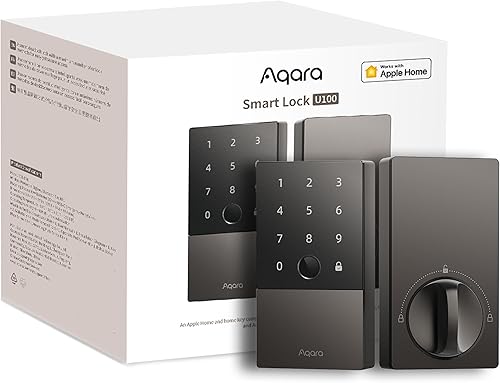
- Fingerprint reader for up to 50 prints
- Apple Home Key support
- 4 AA batteries, up to 8 months
The U100 combines fingerprint access with Apple Home Key and a keypad. Some app, guest sharing and ecosystem features require a compatible hub.
Pros
- Stores up to 50 fingerprints
- Apple Home Key works with iPhone or Apple Watch
- USB-C emergency charging port
- Fingerprint data is stored locally and AES encrypted
Cons
- Remote passwords and Aqara Home features require an Aqara Zigbee 3.0 hub
- Sharing Apple Home Keys requires an Apple Home Hub
- NFC card is sold separately
The lock runs on 4 AA batteries, with a stated life of up to 8 months. A USB-C port provides emergency charging, and the zinc alloy lock body has an IP65 rating.
These features make the U100 a flexible entry lock, but they don't make every smart-home function automatic. Choose it for its local entry choices first, then decide whether its hub-dependent features are worth adding to your setup.
Who should choose the Aqara U100?
Choose the U100 if several household members would use fingerprint entry, or if you want Apple Home Key alongside a keypad and physical key. It also makes sense if you value having different entry methods for residents and visitors.
Skip it if your main goal is remote access without a hub, or if fingerprint recognition isn't useful to your household. The U100 depends on an Aqara Zigbee 3.0 hub for remote passwords and Aqara Home integrations, so someone who wants those features should include the hub in their setup plan.
If you're still weighing entry styles, our guide to keyless door lock types and features explains how keypad, app and biometric options differ.
Which U100 entry methods fit your household?
The U100's fingerprint reader and keypad cover everyday key-free entry, while Apple Home Key works as a tap option with an iPhone or Apple Watch. A mechanical key remains available for emergency use.
Fingerprint entry is handy when family members arrive with their hands free and don't want to remember a code. Before choosing it, consider how many people need access and whether everyone is comfortable using the reader.
The lock can store up to 50 fingerprints.
A keypad may suit visitors or household members who prefer a code. The U100 also supports one-time local passwords for visitors, which Aqara says are generated locally and work without internet access.
Remotely configurable passwords are different: they require the Aqara Home app and an Aqara Zigbee 3.0 hub.
Apple Home Key is a natural choice for people already using an iPhone or Apple Watch at the door. Aqara says it can work even when the phone or watch is out of power, but sharing Apple Home Keys with guests requires an Apple Home Hub.
An NFC card is also supported, but it is sold separately. Factor in that extra purchase if a household member prefers a card to a fingerprint, phone or keypad code.
Which Aqara U100 smart home features require a hub?
The U100 needs different hubs for some Aqara and Apple Home functions. An Aqara Zigbee 3.0 hub enables remote passwords, Aqara Home features and integrations with Google Home, Alexa and IFTTT; an Apple Home Hub is required to share Apple Home Keys.
This distinction matters before you buy. A home can use the U100's local entry methods without relying on those connected features, but remote password setup and Aqara integrations need the Aqara hub.
With the Aqara hub, the lock can take part in automations with Aqara and third-party devices. For example, Aqara describes a setup in which a press on its Video Doorbell G4 lets you view a visitor and open the U100.
Don't assume that having one hub covers every feature. Make a short list of the functions you want.
Then check the hub requirement for each one. Our guide to whether smart locks need a hub explains the broader differences, and Apple Home Key covers how Apple's tap-to-open feature works.
How should you set up and use the U100?
Plan the door fit, access methods and hub connections before installing the U100. The lock's listed dimensions are 5.27 x 3.46 x 2.91 inches; follow Aqara's installation instructions and measure your door and existing deadbolt before you start.
Use the installation process to confirm that the bolt moves freely and the door closes properly. A smart deadbolt still depends on a smooth mechanical fit, so correct binding or alignment problems before relying on automatic locking.
After installation, decide who needs access and set up the methods they will use. Register household fingerprints, choose how visitors will get temporary access, and keep the mechanical key somewhere reachable from outside the locked space.
Next, pair the lock with the hub or ecosystem needed for the features you want. Set up remote passwords through Aqara Home only if you have the Aqara Zigbee 3.0 hub, and use an Apple Home Hub if you plan to share Home Keys with guests.
The built-in gyroscope supports auto-locking after the door closes. Try the feature as part of setup and confirm that the door and bolt close as expected; you can disable auto-lock and leave the door in passage mode if you prefer.
Do Not Disturb mode can mute the lock sounds during a chosen period. Set that schedule around your household's routine, then check that it doesn't interfere with anyone who depends on the lock's normal sound cues.
A common setup mistake is treating local and remote access as the same thing. A one-time local visitor password doesn't require internet access, but remotely configurable passwords need the Aqara hub.
Another mistake is relying on a feature before checking its ecosystem requirement. Confirm the Apple Home Hub or Aqara Zigbee 3.0 hub is in place before promising guests access or building automations around the lock.
For a fit check, see our guide on measuring a door for a keyless lock.
What maintenance does the U100 need?
Plan to replace the 4 AA batteries as needed, and keep a mechanical key available as a backup. Aqara states battery life of up to 8 months, but use and setup can affect how long the batteries last.
The USB-C port can provide emergency charging if the batteries run down. Keep that option in mind, but don't make it your routine power plan; replacing batteries before they fail is more convenient.
Aqara says fingerprint data is stored locally and AES encrypted. It also says the U100 meets the same safety standard as BHMA Level 3; the lock body has an IP65 rating.
Check the door's mechanical movement from time to time, especially if the bolt starts to resist when locking. Auto-lock can only work as intended when the door closes and the bolt travels freely.
For more on what affects upkeep, read our guide to smart lock battery life.
How does the Aqara U100 compare with other smart locks?
The U100 is the right choice among these options when fingerprint access is a priority. The U400 adds UWB hands-free opening, the U50 focuses on keypad and Apple Home Key entry, and Schlage Encode Plus offers built-in Wi-Fi.
| Lock | Entry and connection | Power | A useful distinction |
|---|---|---|---|
| Aqara U100 | Fingerprint, keypad, Apple Home Key, mechanical key; Bluetooth and Zigbee | 4 AA, up to 8 months | Fingerprint reader stores up to 50 prints |
| Aqara U400 | Fingerprint, passcode, Apple Home Key, UWB and physical key; Matter over Thread | Rechargeable battery, up to 6 months | UWB needs supported Apple devices and a Thread-enabled Apple Home hub |
| Aqara U50 | Keypad, Apple Home Key, mechanical key; Bluetooth and Zigbee | 4 AA, up to 6 months | Rekeyable cylinder |
| Schlage Encode Plus | Touchscreen, Apple Home Key and access codes; built-in Wi-Fi | Not specified here | Remote access through Schlage Home app and Wi-Fi |
For a closer comparison of the two fingerprint models, see Aqara U100 vs U400. Our guide to the best Apple Home Key locks helps if you want to compare beyond Aqara.
Is the U50 a better fit than the U100?
Choose the U50 if keypad access and Apple Home Key are enough and you don't need a fingerprint reader. Its cylinder can be rekeyed to match an existing 5-pin key, and it offers one-time local passwords.
Skip the U50 if fingerprints are the reason you're considering the U100. The U50 uses 4 AA batteries with a stated life of up to 6 months, and its exterior rating is IPX5.
Is the U400 worth the extra setup?
Consider the U400 if you want hands-free UWB opening and have the required Apple devices and hub. UWB needs a Thread-enabled Apple Home hub, as well as a supported iPhone or Apple Watch and the required software version.
The U400 also offers fingerprint, touchscreen passcode, Apple Home Key, NFC card support and a physical key. Its rechargeable battery lasts up to 6 months per charge, but skip it if you don't need UWB or don't want to check device compatibility.
When should you choose Schlage Encode Plus?
Choose Schlage Encode Plus if built-in Wi-Fi and remote access matter more than fingerprint entry. It connects to a secure Wi-Fi network and works through the Schlage Home app, with up to 100 access codes.
Skip it if you specifically want a fingerprint reader, which isn't among its listed access features. It supports Apple Home Key, Alexa and Google Assistant, so it may fit a home that values app access and those integrations.
What should you check before buying the Aqara U100?
Check your door fit, hub needs and preferred entry methods before buying. Measure the door and deadbolt, then confirm that the U100's dimensions and Aqara's installation instructions match your setup.
Write down who will use the lock and how each person will get in. A household that wants fingerprint access may be well served by the U100, while one that needs remote access should confirm the Aqara Zigbee 3.0 hub is part of the plan.
Decide whether you need Apple Home Key sharing, remote passwords, third-party ecosystem support or local visitor passwords. Those choices determine which hub, if any, you need and help prevent buying the lock expecting every connected feature to work on its own.
Finally, plan the physical backup. Keep the included mechanical key outside the locked area, and know where you can access a USB-C power source if you need emergency charging.
Should you choose the Aqara U100?
Choose the Aqara U100 if fingerprint entry, Apple Home Key and keypad access are the combination you want. It is a strong fit for homes that value flexible local entry and are willing to add an Aqara Zigbee 3.0 hub for remote passwords and Aqara integrations.
Pick the U50 if a keypad and rekeyable cylinder are enough, the U400 if compatible hands-free UWB entry is your priority, or Schlage Encode Plus if built-in Wi-Fi and remote access matter most. If you're still comparing the two Aqara fingerprint locks, read Aqara U100 vs U400 before deciding.
Frequently asked questions
Does the Aqara U100 work with Apple Home Key?
Yes. The U100 supports Apple Home Key, so you can tap an iPhone or Apple Watch to open.
Apple Home Key sharing requires an Apple Home Hub, so check your setup if guests need access through Apple Home.
Does the Aqara U100 need a hub?
Not for every entry method. Fingerprint, keypad and mechanical key access are available locally, while remote passwords and Aqara Home integrations require an Aqara Zigbee 3.0 hub.
Sharing Apple Home Keys requires an Apple Home Hub.
How long do Aqara U100 batteries last?
Aqara says the U100 can run for up to 8 months on 4 included AA batteries. Battery life varies with use and setup, so keep replacement batteries available and check the lock's battery status through its app.
Does the Aqara U100 have a backup key?
Yes. The U100 includes a mechanical key for emergency use, along with a USB-C port for emergency charging.
Store the key somewhere accessible outside the locked room, and follow Aqara's instructions if you need emergency charging.