Schlage Encode vs Arrive: Which Wi-Fi Deadbolt Is Better? (October 2026)
Choose Schlage Encode for a touchscreen and built-in alarm, or Arrive for backlit physical buttons and more access codes. Both offer built-in Wi-Fi and remote Schlage Home app control.
On this page (10 sections)
- Schlage Encode vs Arrive: what are the key differences?
- Which keypad fits your household?
- How much code capacity do you need?
- Which lock offers the security feature you want?
- Do Encode and Arrive need a hub for remote access?
- What should you check before installation?
- How do batteries and daily use compare?
- What mistakes should you avoid when choosing?
- Is Schlage Encode Plus worth considering?
- Which Schlage Wi-Fi deadbolt should you choose?
For Schlage Encode vs Arrive, choose Encode for its touchscreen and built-in alarm, or Arrive for physical buttons and a higher code limit. Both connect to home Wi-Fi and support remote control through Schlage Home, so your keypad preference and access needs should drive the choice.
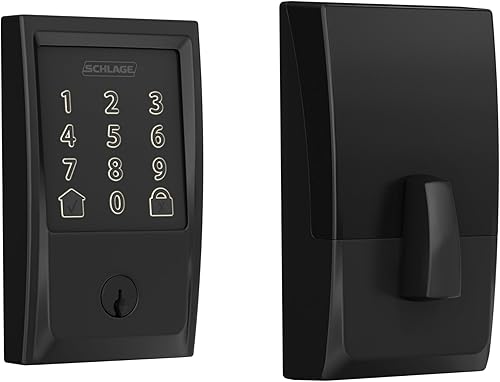
The main difference appears at the door. Encode has a touchscreen; Arrive has backlit push buttons and supports up to 250 access codes, compared with Encode's limit of 100.

Schlage Encode vs Arrive: what are the key differences?
Encode pairs a touchscreen with a customizable alarm, while Arrive pairs physical buttons with more code capacity. Both are Wi-Fi deadbolts that work with the Schlage Home app for remote locking and opening.
Their app features overlap: you can manage codes, view lock history, receive customizable notifications and manage multiple locks. Both also work with Alexa and Google Home when paired with the app and a voice-enabled device.
Encode's alarm can be customized for door movement and forced entry attempts. Arrive instead emphasizes tactile entry, with all-weather silicone buttons that are backlit for low-light visibility.
| Product | Best for | Keypad | Access codes | Connectivity | Our score |
|---|---|---|---|---|---|
| Schlage Encode | touchscreen fans | Touchscreen | Up to 100 | Built-in Wi-Fi | 9.0 |
| Schlage Arrive | frequent guests | Backlit push buttons | Up to 250 | Built-in Wi-Fi | 7.9 |
| Schlage Encode Plus | Apple users | Touchscreen | Up to 100 | 7.8 |
Which keypad fits your household?
Pick the keypad style that the people using the door will find easiest to operate. Encode suits buyers who prefer a touchscreen, while Arrive is the clearer match for anyone who wants buttons they can feel pressing.
A touchscreen gives Encode a flat keypad surface and is fingerprint resistant. Consider the people who will use it: a physical button press can feel more familiar, while a touchscreen may better match your preference for a smooth keypad.
Arrive's backlit silicone buttons help when someone enters a code in low light. Their tactile press can also suit users who prefer a distinct button for each digit.
The decision is personal, so picture the most common entry: hands full, arriving after dark, or letting a guest in. If button feel matters most, favor Arrive; if a touchscreen and alarm matter more, favor Encode.
For a wider look at keypad locks and other entry methods, see our guide to keyless door lock types and features.
How much code capacity do you need?
Arrive supports up to 250 access codes, compared with Encode's limit of 100. Arrive gives you more room if you regularly create separate codes for family, guests or other people who need access.
Start by estimating how many codes you'll actively manage, including occasional visitors. A larger maximum is useful when access changes often, but it doesn't make Arrive the automatic choice for a household with only a few regular users.
Both locks let you manage codes through Schlage Home. The app also supports lock history and customizable notifications, which help you keep track of activity without relying on a keypad alone.
If you're choosing among keypad styles beyond these two Wi-Fi locks, our keypad deadbolt guide compares other options.
Which lock offers the security feature you want?
Choose Encode if you want a built-in alarm that can be customized for door movement and forced entry attempts. Both models have an encrypted connection and a fingerprint-resistant keypad surface.
Schlage says both locks have the highest residential Security, Durability and Finish rating certified by BHMA industry experts. Arrive uses fingerprint-resistant buttons, while Encode uses a fingerprint-resistant touchscreen.
The lock's features work best as part of a sound entry routine. Use codes thoughtfully, review access when circumstances change, and make sure the deadbolt fits and is installed correctly.
For more guidance on the broader tradeoffs, read whether keyless door locks are safe.
Do Encode and Arrive need a hub for remote access?
No separate hub is needed for their core remote access, because both have built-in Wi-Fi. When connected to your home network and paired with Schlage Home, each can be managed from away.
Both support locking and opening remotely, code management, lock history and customizable notifications. Encode also works with the Key by Amazon app, while both models support Alexa and Google Home.
Arrive has a nearby Bluetooth option through the Schlage Home app. Its codes and schedules remain active during a Wi-Fi outage, but remote access from away depends on a Wi-Fi connection.
For a plain-language explanation of hubs and smart-lock connections, see whether a smart lock needs a hub.
What should you check before installation?
Measure your door thickness and backset before buying either lock. Both fit standard doors that are 1-3/8 to 1-3/4 inches thick, with a 2-3/8 or 2-3/4 inch backset.
Both are designed for installation with a screwdriver and need no hardwiring. Follow the instructions for the exact lock, and make sure the deadbolt moves freely before relying on keypad or app features.
Encode's Snap 'n Stay design helps hold the lock on the door during installation, leaving both hands free. Arrive includes interactive digital instructions, so consider which installation guidance sounds more useful to you.
Measure the door rather than guessing from the old lock's appearance. Our door measuring guide explains which dimensions to check.
How do batteries and daily use compare?
Encode specifies four included AA batteries and up to six months of life with typical use. Arrive is battery powered, but its battery count and expected life aren't specified here.
Encode shows a low-battery indicator on the touchscreen and in the Schlage Home app, and includes one physical backup key. Arrive's listed features focus on app access, codes and its push-button keypad.
For either lock, make battery checks part of routine home care and respond to low-battery notices promptly. Keep your access plan clear: know which codes are active, and make sure household members understand how they'll enter if Wi-Fi is unavailable.
What mistakes should you avoid when choosing?
Don't choose by code capacity alone if the keypad feel or alarm matters more in daily use. Arrive's larger maximum is useful only if you need the extra room; Encode's alarm and touchscreen may be more relevant to another household.
A second mistake is assuming that app control means every function works from anywhere without a connection. Remote control requires a secure Wi-Fi connection, while Arrive's Bluetooth app access applies when you're within range.
Also avoid skipping measurements or assuming that a lock will fit because the existing deadbolt looks standard. Check door thickness and backset, then follow the model-specific installation steps.
Is Schlage Encode Plus worth considering?
Consider Encode Plus if Apple Home Key matters more than Arrive's buttons or higher code limit. It supports tap-to-open with an iPhone or Apple Watch, as well as built-in Wi-Fi and a touchscreen.
Encode Plus supports up to 100 access codes and has a customizable built-in alarm. It also works with Alexa and Google Assistant, but its Apple Home Key support is the reason to consider it alongside these two models.
If Apple access is a priority, compare more options in our guide to Apple Home Key smart locks. For a direct Encode versus Arrive choice, weigh keypad style, code capacity and the alarm.
Which Schlage Wi-Fi deadbolt should you choose?
Choose Encode for its touchscreen, alarm and included physical backup key; choose Arrive for backlit buttons and up to 250 access codes. Both offer built-in Wi-Fi and Schlage Home app control, so the best fit comes down to how you enter and manage access.
Encode suits households that want a customizable alarm and touchscreen entry, and can work with a maximum of 100 codes. Skip it if tactile buttons or room for more codes matter more to you.
Arrive is the better fit for frequent guest access or anyone who prefers physical buttons. Skip it if Encode's built-in alarm is the feature you want most.
For the Schlage Encode vs Arrive decision, let the keypad and code limit settle the choice first, then check the door measurements and your Wi-Fi needs. If tap-to-open with an iPhone or Apple Watch is the deciding factor, consider Schlage Encode Plus and other Apple Home Key locks.
Frequently asked questions
What is the main difference between Schlage Encode and Arrive?
Encode has a touchscreen keypad and a customizable built-in alarm for door movement and forced entry attempts. Arrive uses backlit physical buttons and supports up to 250 access codes, compared with Encode's limit of 100.
Both have built-in Wi-Fi and Schlage Home app control.
Does Schlage Arrive work without Wi-Fi?
Arrive can use the Schlage Home app over Bluetooth when you're within Bluetooth range. Its access codes and schedules also stay active during a Wi-Fi outage.
Remote control from away requires a Wi-Fi connection.
Can Schlage Encode and Arrive work with Alexa?
Both support Alexa and Google Home when paired with the Schlage Home app and a voice-enabled device. Arrive also supports linking with smart home devices for automated routines.
Choose based on the keypad and code capacity if voice control is your main requirement.
Should I choose Schlage Encode Plus instead?
Choose Encode Plus if you want Apple Home Key, which lets you tap with an iPhone or Apple Watch to lock or open. It also has built-in Wi-Fi, a touchscreen and up to 100 access codes.
For physical keypad buttons or more codes, Arrive is the closer fit.