Aqara U100 vs U400: Which Fingerprint Lock Is Better? (October 2026)
Choose the Aqara U400 for hands-free UWB entry, or the U100 for fingerprint access with Apple Home Key. UWB depends on compatible Apple devices and a Thread-enabled hub; the U100 uses AA batteries and Zigbee.
On this page (10 sections)
- Aqara U100 vs U400: what is the main difference?
- Who should buy the Aqara U100?
- Who should buy the Aqara U400?
- Which lock is better for Apple Home Key?
- Is UWB worth choosing over fingerprint entry?
- How do the U100 and U400 compare on smart home support?
- Which battery setup is easier to manage?
- Are the U100 and U400 suitable for an exposed door?
- What setup steps prevent common lock mistakes?
- Which Aqara lock should you choose?
Choose the U400 for hands-free UWB entry, or the U100 for fingerprint access and simpler AA battery swaps. In this Aqara U100 vs U400 comparison, the decision depends on how you enter, which smart home hubs you already have and whether recharging suits your routine.
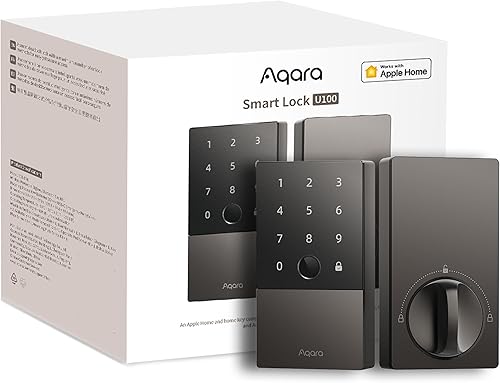
Both locks offer Apple Home Key, passcodes and a mechanical key. The U100 centers on fingerprint access and Zigbee, while the U400 adds UWB approach opening and Matter over Thread.
Aqara U100 vs U400: what is the main difference?
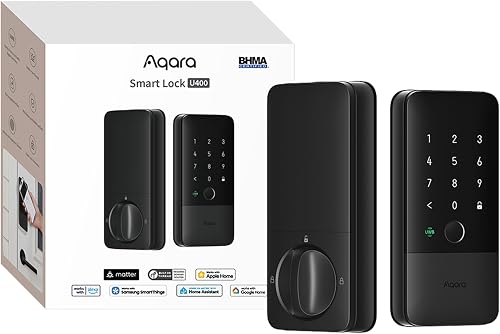
The U400 adds UWB hands-free opening, while the U100 makes fingerprint entry its main convenience feature. Both support Apple Home Key and a physical key, so neither requires you to rely on only one way in.
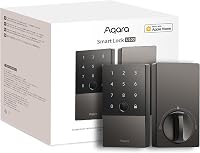
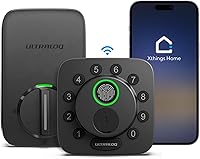
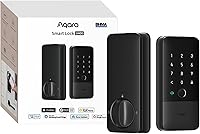
The U100 stores up to 50 fingerprints and supports passwords. Remote password setup through Aqara Home requires an Aqara Zigbee 3.0 hub, as do its listed third-party smart home integrations.
The U400 also supports fingerprint and touchscreen passcode entry, plus app remote access, voice assistant control and NFC cards. The NFC card is sold separately, so count it as an extra access method only if you are willing to get the card.
UWB is the feature that sets the U400 apart. It uses a supported Apple device's position, direction and approach to judge when you intend to enter, instead of opening just because you are near the door.
Who should buy the Aqara U100?
Buy the U100 if you want fingerprint entry, Apple Home Key and replaceable AA batteries. It's a straightforward fit when you do not need approach opening and are comfortable with the Aqara hub requirement for remote passwords and integrations.
The fingerprint reader can serve family members or regular visitors without asking them to remember a code. The lock can store up to 50 fingerprints, while one-time local passwords can help when someone needs temporary access and internet access is unavailable.
The U100 is also the practical pick if you already use an Aqara Zigbee 3.0 hub. That hub enables remote password configuration and the listed integrations with Google Home, Alexa and IFTTT.
Skip the U100 if your main goal is hands-free entry as you walk up. It also may not suit you if you want Matter over Thread or want remote passwords without adding an Aqara Zigbee hub.
Who should buy the Aqara U400?
Buy the U400 if supported Apple devices and a Thread-enabled Apple Home hub are already part of your setup, and you want hands-free arrival. It is especially useful when you often carry bags, wear gloves or arrive in wet weather.
The U400 keeps other entry options available, including a fingerprint reader, passcode, Apple Home Key and physical key. That gives you alternatives when your phone or watch is unavailable, or when you prefer a familiar method.
Its Matter over Thread connection suits a home that uses more than one smart home platform. Each ecosystem still needs its own Thread-enabled Matter controller for its features, so check the controllers you have before counting on cross-platform access.
Skip the U400 if you cannot meet its Apple device and hub requirements for UWB, or if you do not want to recharge a removable battery. If fingerprints and keypad access are enough, the U100 may be a better match.
Which lock is better for Apple Home Key?
Either lock can work for tap-to-open in an Apple household. Choose based on whether you also want U100 fingerprint access or U400 UWB entry, and confirm the hub needed for the Apple features you plan to use.
The U100 supports tapping with an iPhone or Apple Watch, including when the device is out of power. Sharing Apple Home Keys requires an Apple Home hub.
The U400 supports Home Key tapping as well as UWB. Home Key and UWB have different device and controller requirements, so do not assume that a device compatible with one feature automatically supports the other.
For a plain-language explanation of the tap feature and compatible locks, see our guide to what Apple Home Key is and which locks offer it.
Aqara U100 vs U400 for an Apple household
Choose the U100 for fingerprint entry plus Home Key; choose the U400 for UWB approach entry plus Home Key. The extra U400 convenience only pays off if your Apple devices and hub meet its requirements.
UWB on the U400 requires a Thread-enabled Apple Home hub, an iPhone 11 or later except iPhone SE and iPhone 16e, or an Apple Watch Series 6 or later except SE. Those devices need iOS 18.5 or watchOS 11.5 or later.
If you mostly use Home Key by tapping, the U100 already covers that routine. If you want the door to respond as you approach, verify the UWB requirements before buying.
Is UWB worth choosing over fingerprint entry?
UWB is worth choosing when you regularly arrive with your hands occupied and have the required Apple setup. If you are happy to touch a reader or keypad, the U100's fingerprint and password options are simpler to plan around.
UWB is designed to distinguish an intentional approach from simply passing by or standing near the entrance. The device and hub requirements make it a more specific use case than ordinary tap-to-open.
Fingerprint access works without carrying a supported Apple device to the door. The U100 stores up to 50 fingerprints, and both locks support fingerprint entry, so the key distinction is UWB availability rather than whether you can use a finger.
Keep a physical key accessible as a backup, even if you expect to use a fingerprint, phone or watch most days. That gives you a familiar option when batteries or devices need attention.
How do the U100 and U400 compare on smart home support?
The U100 uses Zigbee, while the U400 uses Matter over Thread. The better choice is the one that fits the hubs and platforms you already use.
With an Aqara Zigbee 3.0 hub, the U100 supports Aqara Home and listed integrations with Google Home, Alexa and IFTTT. Aqara describes automations with its devices, including viewing a visitor through an Aqara video doorbell and opening the U100.
Matter over Thread lets the U400 connect with multiple smart home platforms simultaneously. Each platform still needs a Thread-enabled Matter controller for its features.
For the basics behind platform compatibility, read what Matter means for smart locks and whether a smart lock needs a hub. Those guides can help you identify which controller or hub your planned setup needs.
Should you choose Zigbee or Matter over Thread?
Choose Zigbee if you already have the Aqara hub and want the U100's remote password features. Choose Matter over Thread if you have the right controllers and want the U400 on multiple platforms.
Do not buy based on a platform logo alone. Write down the automations and remote features you expect to use, then check that each one is supported by the lock and the hubs in your home.
Which battery setup is easier to manage?
The U100 uses 4 AA batteries for up to 8 months, while the U400's rechargeable battery lasts up to 6 months per charge. Pick the power system you find easier to maintain, since both need a plan for low battery.
With the U100, keep a spare set of AA batteries where you can find them. Its USB-C port is for emergency charging, not a replacement for changing the batteries as part of normal upkeep.
The U400's battery is removable and rechargeable. You can charge it through the lock's USB-C port without taking the lock offline, or remove it to charge separately; a voice alert sounds below 20 percent.
These stated runtimes are estimates, not calendar reminders. Usage affects battery life, so pay attention to alerts and check charge or battery condition during routine home upkeep.
For more ways to plan for battery changes and low-power alerts, see our guide to smart lock battery life.
Are the U100 and U400 suitable for an exposed door?
Both have an IP65 rating, and the U400 is BHMA-certified. The U100 is described as meeting the same safety standard as BHMA Level 3, while no specific level is given for the U400.
The U100 has a zinc alloy body and a stated operating range of -31°F to 151°F. The U400 has an aluminum body and an IP65-rated exterior, but its temperature range is not specified here.
An IP rating does not confirm that a lock fits every door or every installation. Check the door preparation and deadbolt fit before ordering, especially if you are replacing a lock on an unusual door.
Our guide to measuring a door for a keyless lock walks through the measurements to check first.
What setup steps prevent common lock mistakes?
Check the door, hubs and preferred entry method before you install either lock. A little planning helps avoid buying a feature you cannot use or discovering that your deadbolt binds after installation.
First, confirm that the door and deadbolt are suitable for a smart deadbolt, and measure the existing hardware. Follow the included installation instructions and make sure the bolt moves freely before relying on motorized locking.
Next, set up the access methods you will actually use. Add fingerprints or passcodes, test the physical key, and verify Apple Home Key with the required hub before depending on shared access.
For the U100, have the Aqara Zigbee 3.0 hub ready if you want remote passwords or the listed integrations. For the U400, confirm your Apple device software and Thread-enabled Apple Home hub before expecting UWB to work.
A common mistake is to treat emergency access and everyday access as the same thing. Keep a key available, understand the battery alert or replacement routine, and check auto-lock settings so the door behaves as you expect after entry.
Which Aqara lock should you choose?
Pick the U400 if hands-free UWB entry and Matter over Thread match your devices; pick the U100 if you want fingerprint-first access, Zigbee integrations and AA batteries. That is the clearest decision rule for Aqara U100 vs U400.
Choose the U100 for a household that prefers fingerprints or passcodes and already has, or plans to add, an Aqara Zigbee 3.0 hub for remote features. Choose the U400 for supported Apple users who want to approach the door without tapping or typing.
If neither feature set fits, look at the broader best Matter smart locks guide before settling on a platform. For a closer look at the fingerprint-focused option, read our Aqara U100 review.
External references: Aqara U100, Aqara U400.
Frequently asked questions
Is the Aqara U100 or U400 better?
The Aqara U400 is the better fit if you want UWB hands-free entry with supported Apple devices. Choose the U100 for fingerprint-first access and AA batteries.
Both support Apple Home Key, but their hub requirements differ, so check those before you buy.
Does the Aqara U400 have a fingerprint reader?
Yes. The Aqara U400 supports fingerprint entry, along with UWB and passcodes.
It also supports Apple Home Key, app remote access, voice assistant control, NFC cards sold separately and a physical key.
UWB is optional and requires a compatible Apple setup.
Does the Aqara U100 support hands-free opening?
No. The U100 supports fingerprint entry and Apple Home Key tap-to-open.
It also supports passwords and a mechanical key.
It doesn't offer UWB approach opening, which is the U400 feature for entering without tapping or typing.
Do the Aqara U100 and U400 need a hub?
Some features need a hub. The U100 requires an Aqara Zigbee 3.0 hub for remote passwords and certain integrations.
U400 UWB entry needs a Thread-enabled Apple Home hub.
Each Matter ecosystem needs its own Thread-enabled controller for its features.
Can the Aqara U100 and U400 use Apple Home Key?
Yes. Both support Apple Home Key tap-to-open with an iPhone or Apple Watch.
Sharing Home Keys on the U100 requires an Apple Home hub.
The U400 needs an Apple Thread-enabled Matter controller, such as a HomePod 2nd Gen, HomePod mini or Apple TV 4K from 2021 or 2022.